
Every file, on every record, on your storage.
Previews, sharing and version history on every record, with the files themselves stored in S3, Azure, Google Cloud or SharePoint. The Salesforce file experience your team already knows, on the storage you already pay for.

Sliick apps are installed by teams at















Salesforce file storage is expensive and finite, so teams ration what they attach, or keep files in drives nobody in Salesforce can see.
A fast, familiar file experience on every record, backed by your own storage.
See it in action.
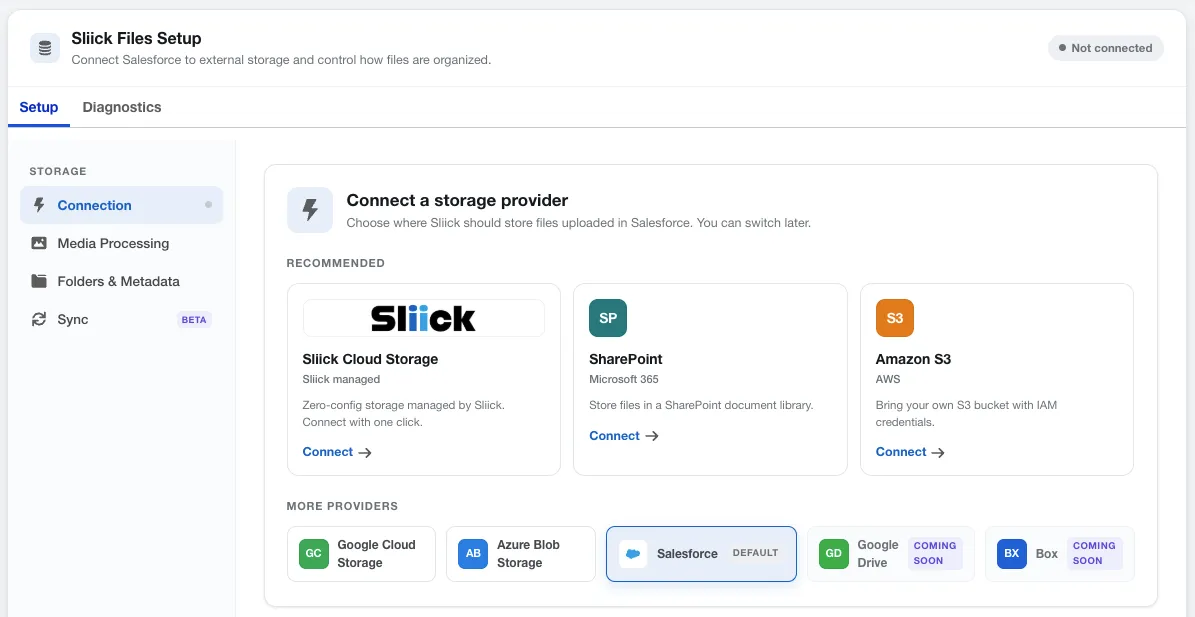
Connect your own storage
Point Sliick Files at SharePoint, Amazon S3, Google Cloud, Azure, or Sliick Cloud Storage - or keep using Salesforce Files. You choose where every file lives, and you can switch later.
Free to install, and there is no catch.
Most organisations use our apps without paying us anything. Some pay us for extra help, and that funds the apps for everyone else.
Read how it worksNo per-seat fees, no user caps
The core app runs in production at no licence cost. Any premium features are named up front.
Giving back to the community
Not every team can have a Salesforce CTA building for them. These apps put CTA-built tools in every org that wants them.
Kept current by paid client work
We deliver client projects on these apps, so fixes and features flow back to everyone.
Everything Sliick Files does
The file experience, your own storage and the complete developer API are free. A few advanced storage features are premium, so talk to us about those.
Files on the record
- Free
Any file type
Documents, PDFs, spreadsheets and images in one organised list.
- Free
Tags, search and sort
Find the right file as the library grows.
- Free
Version history
Every version kept, so nothing is lost when a file is replaced.
- Free
Instant previews
See documents, images and PDFs inline without downloading.
- Free
Record, app and Experience Cloud pages
The same component for staff and portal users.
Storage and API
- Free
Salesforce Files or your own cloud
Keep files in Salesforce, or in Amazon S3, Azure, Google Cloud or SharePoint.
- Free
S3-compatible storage
Backblaze B2, Wasabi, Cloudflare R2 and MinIO.
- Free
Developer API
Upload, list, download, move, rename and delete from Apex, Flow and REST.
- Contact us
Two-way sync
Changes made directly in your storage flow back into Salesforce.
- Contact us
File migration
Move the files already in Salesforce out to your own storage.
- Contact us
Share links
Send a secure link to people outside Salesforce. Not needed on SharePoint, which has its own sharing.
Need sync, migration or share links?
Tell us about your storage and we will set it up with you.
Want us to look after it for you?
Our managed service sets up and runs Sliick Files with you, with premium support from the team that builds it, alongside the rest of your Salesforce org.
More Sliick apps
See all five apps Free
 Free
 Free
 Free
Put Sliick Files to work this week.
Free on AppExchange. No sales call, and you stay in control of your data.