
Build forms and surveys in Salesforce. Publish them anywhere.
Build branded forms and surveys in the drag-and-drop builder, map their fields to objects, publish, and every answer lands on the right Salesforce record. No middleware, no re-keying.
Sliick apps are installed by teams at















Forms and surveys live in a separate tool, then someone copies the answers into Salesforce by hand: slow, and error-prone.
Forms and surveys that write straight to the record, on brand, with nothing to re-key.
See it in action.
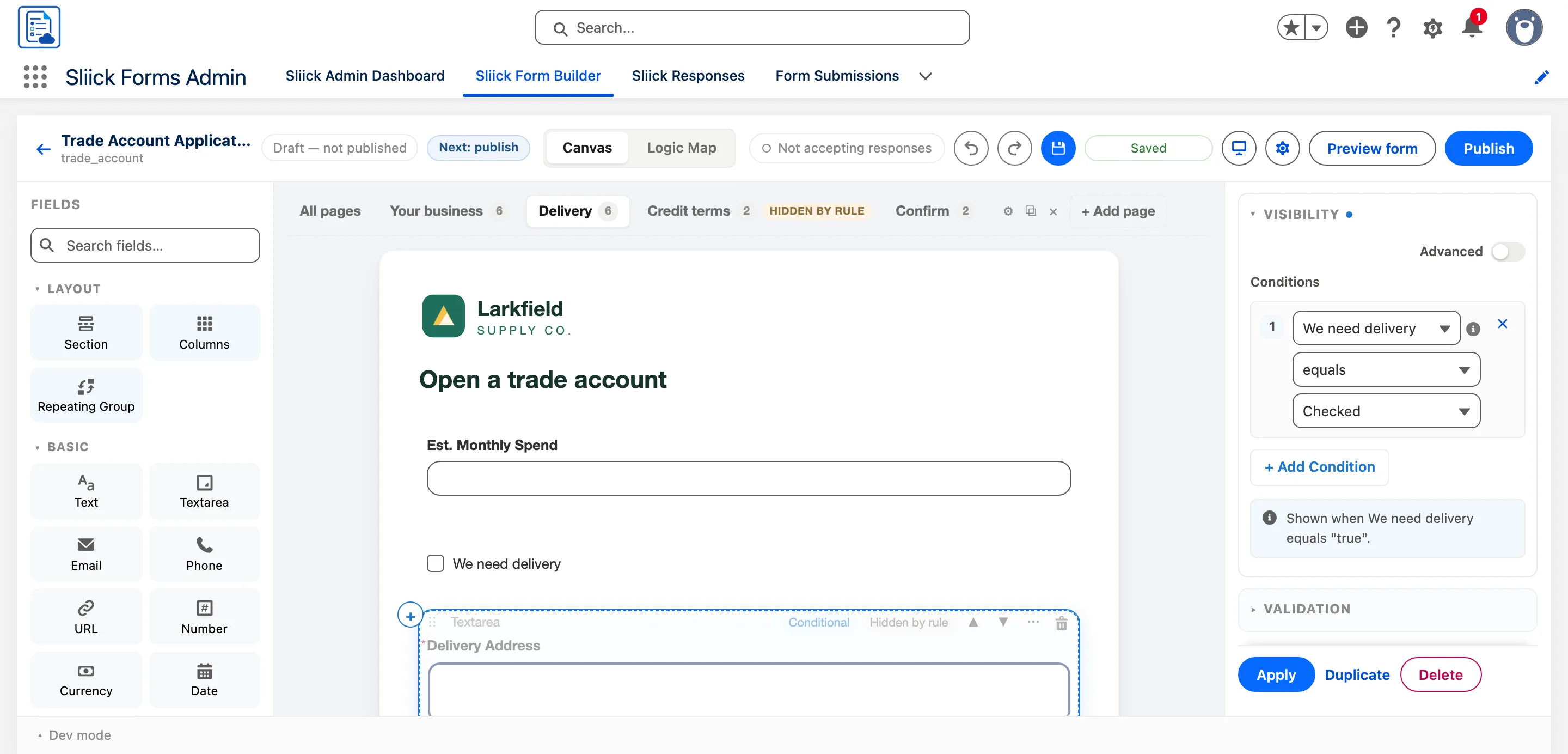
Multi-page forms with conditional fields
Split a form into pages and move between them with the tabs above the canvas. Any field, or a whole page, can be shown only when an earlier answer calls for it. Each rule is built from dropdowns and read back in plain language, on the canvas and in the inspector.
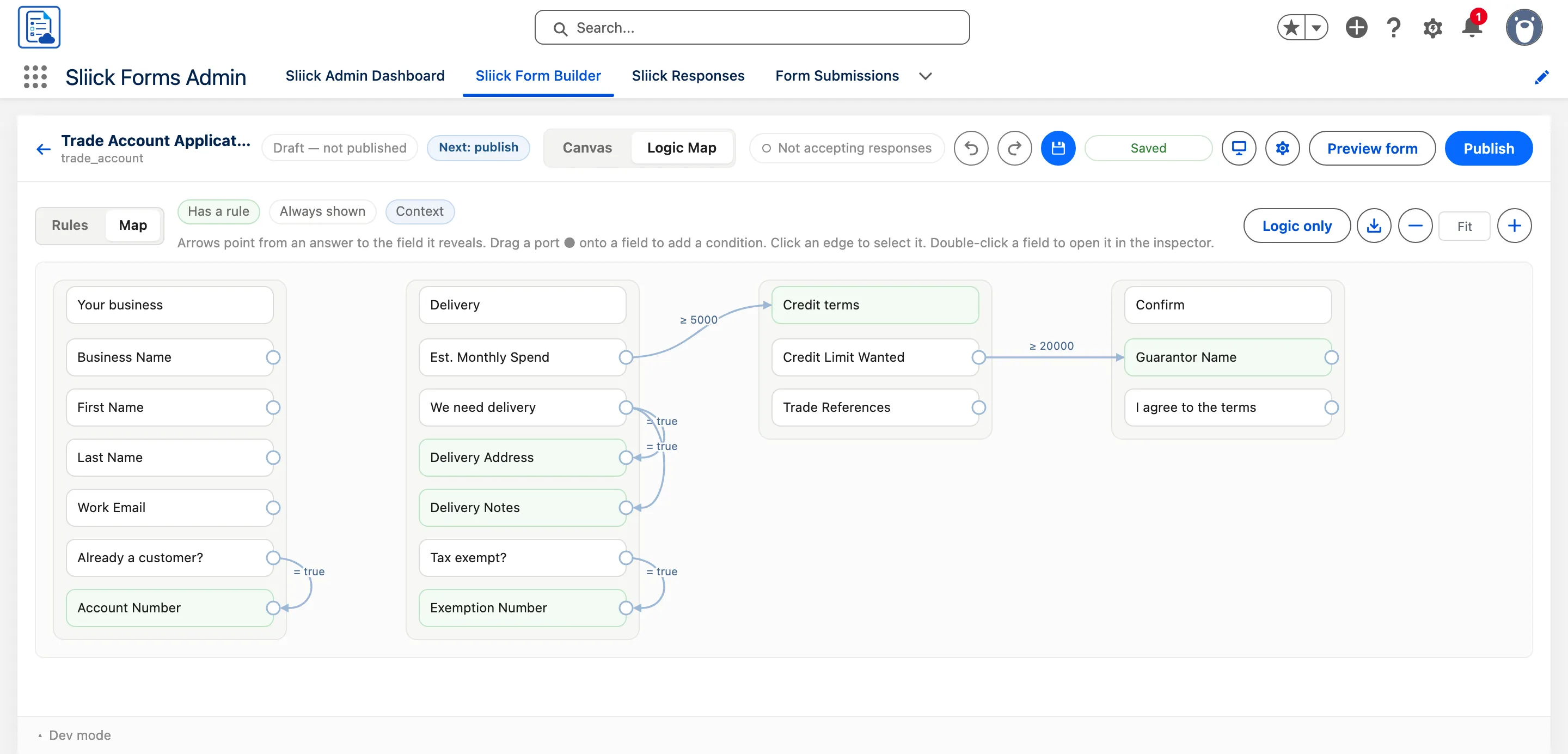
See every rule on one map
The Logic Map lays out each page as a column and draws an arrow from every answer to the field or page it reveals, so the whole flow is visible at a glance. Drag from a field's port to add a new condition, or switch to the Rules list to read and edit each rule in plain language.
Match your brand, with a live preview
Brand colour, font, logo, rounded corners and space between fields are all set from one panel. The two length settings are chosen by name, Square through Pill and Compact through Roomy, with a custom length still available and a live preview as you type.
Free to install, and there is no catch.
Most organisations use our apps without paying us anything. Some pay us for extra help, and that funds the apps for everyone else.
Read how it worksNo per-seat fees, no user caps
The core app runs in production at no licence cost. Any premium features are named up front.
Giving back to the community
Not every team can have a Salesforce CTA building for them. These apps put CTA-built tools in every org that wants them.
Kept current by paid client work
We deliver client projects on these apps, so fixes and features flow back to everyone.
Everything Sliick Forms does
Building, publishing and processing forms and surveys is free. The mobile app, for teams who fill forms in the field without a connection, is premium, so talk to us about it.
Build
- Free
Drag-and-drop builder
Drag fields into place, move blocks as a unit, and undo any of it.
- Free
Conditional logic
Rules read back in plain English, with a Logic Map and simulation mode.
- Free
Multi-page forms
Add, rename and reorder pages, each with its own visibility rule.
- Free
Sections, columns and repeating groups
Repeating groups create child records under the right parent.
- Free
Versions and A/B tests
Publish a fixed version, compare and restore, or run a 50/50 test.
Publish and process
- Free
Mapping, matching and record types
Map each field to Object.Field and match on fields to update, not duplicate.
- Free
Personalised links from a record
Prefilled from the record, expire in 7 days and work once.
- Free
Responses console
Filter, export, preview processing, correct answers and retry failures.
- Free
Operator access
Staff work responses and send links without being able to change a form.
- Free
Public or private
Your own public address, behind portal login, or open on Experience Cloud.
- Free
Save and continue
Pick a long form up later from any device, exactly as it was left.
Mobile app
iOS and Android- Contact us
Works offline
Load forms while online, then fill them anywhere: a basement, a site visit, a paddock.
- Contact us
Automatic sync
Submissions queue on the device and send themselves when the connection returns.
- Contact us
Offline photo capture
Take photos on the job and they upload in the background once back online.
- Contact us
Field capture
Scan barcodes, record GPS location and capture signatures on the device.
- Contact us
Kiosk mode
Lock a tablet to one form for a front desk, event or site gate.
Filling forms where there is no signal?
Tell us about your field teams and we will set up the mobile app with you.
Want us to look after it for you?
Our managed service sets up and runs Sliick Forms with you, with premium support from the team that builds it, alongside the rest of your Salesforce org.
More Sliick apps
See all five apps


Put Sliick Forms to work this week.
Free on AppExchange. No sales call, and you stay in control of your data.