
Sliick Docs v1.6: Generally Available
Sliick Docs v1.5 let a single template follow your data through every level of detail, with live previews and rich-text fields. v1.6 lands two things at once: a round of editor craft that closes the most common authoring gaps, and a portability engine that lets teams promote templates between Salesforce orgs the same way they already promote code. It remains native-tier, with no new external dependencies.
This article gives a high-level overview of what has changed since v1.5. For the step-by-step walkthrough, see the Sliick Docs Complete User Guide.
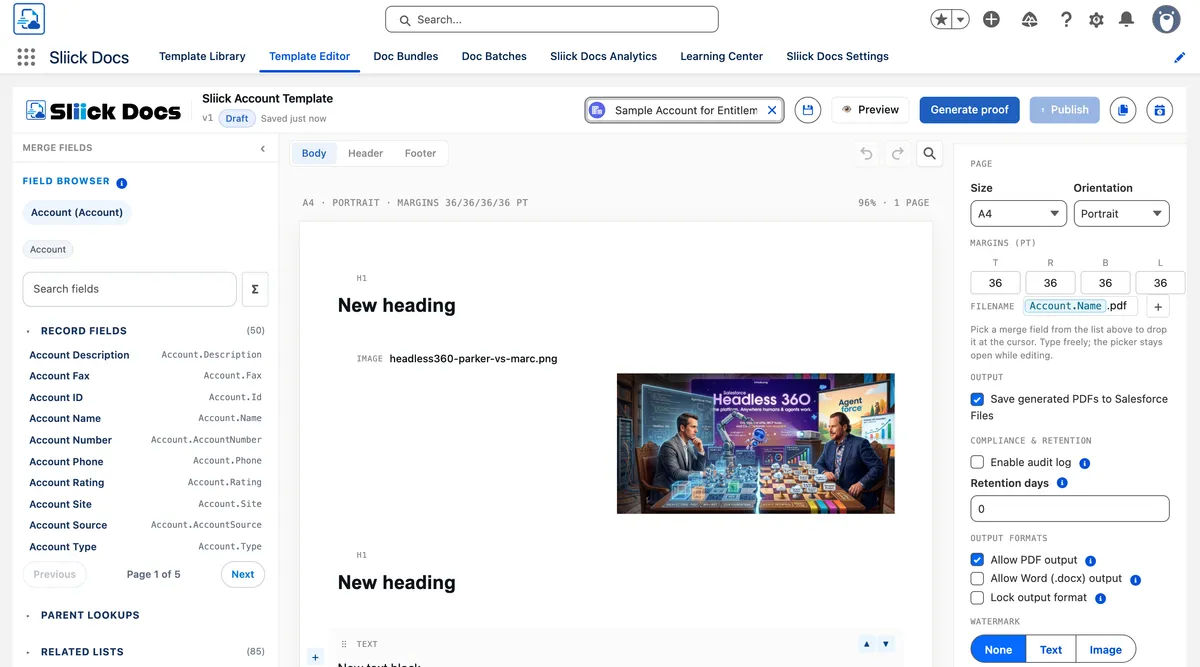
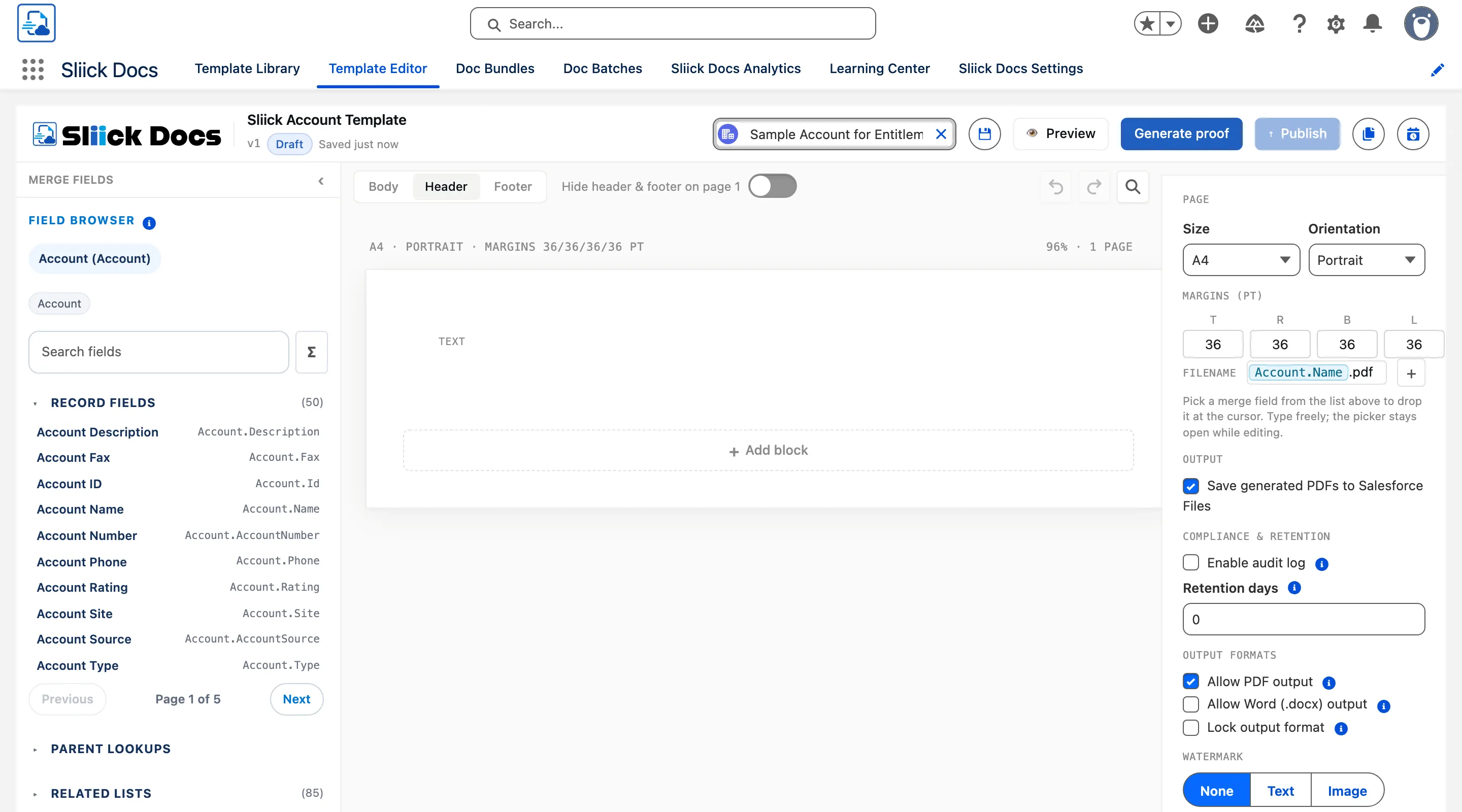
Running headers and footers with page numbers
This was the single most-requested gap. Documents can now carry running headers and footers with page numbers and dynamic merge content - an account name in the header, a page count in the footer, or both. Authors edit header and footer content directly on the canvas, with a simple switcher between body, header, and footer. A “different first page” toggle lets you omit the header from a cover page, which is the most common layout for proposals and statements.
Drag-and-drop block reorder and undo/redo
Blocks on the canvas can now be reordered by dragging them, and every change is tracked in a proper undo/redo stack. Undo with Cmd+Z (or Ctrl+Z on Windows), redo with Cmd+Shift+Z, or use the buttons in the toolbar. Each editing surface - body, header, footer - keeps its own history, so undoing a footer change does not touch the body. These are small things individually, but together they remove the friction that made the first ten minutes of authoring feel rough.
Line items as table rows
A repeating section can now render its iterations as table rows - one row per child record - instead of only as stacked blocks. This is the layout that invoices, statements, and order summaries need, and now the template handles both from the same editor.
Tables also gain merged-cell support. New Merge right and Split buttons in the cell properties panel let authors create colspan title rows and total rows without touching code. The canvas renders merged cells at their true width, and column operations (add, remove) stay in lockstep with the merged geometry so the table never corrupts silently. Vertical merge (rowspan) is deferred - horizontal merge alone covers the title-row and total-row patterns that most templates need.
Flexible columns
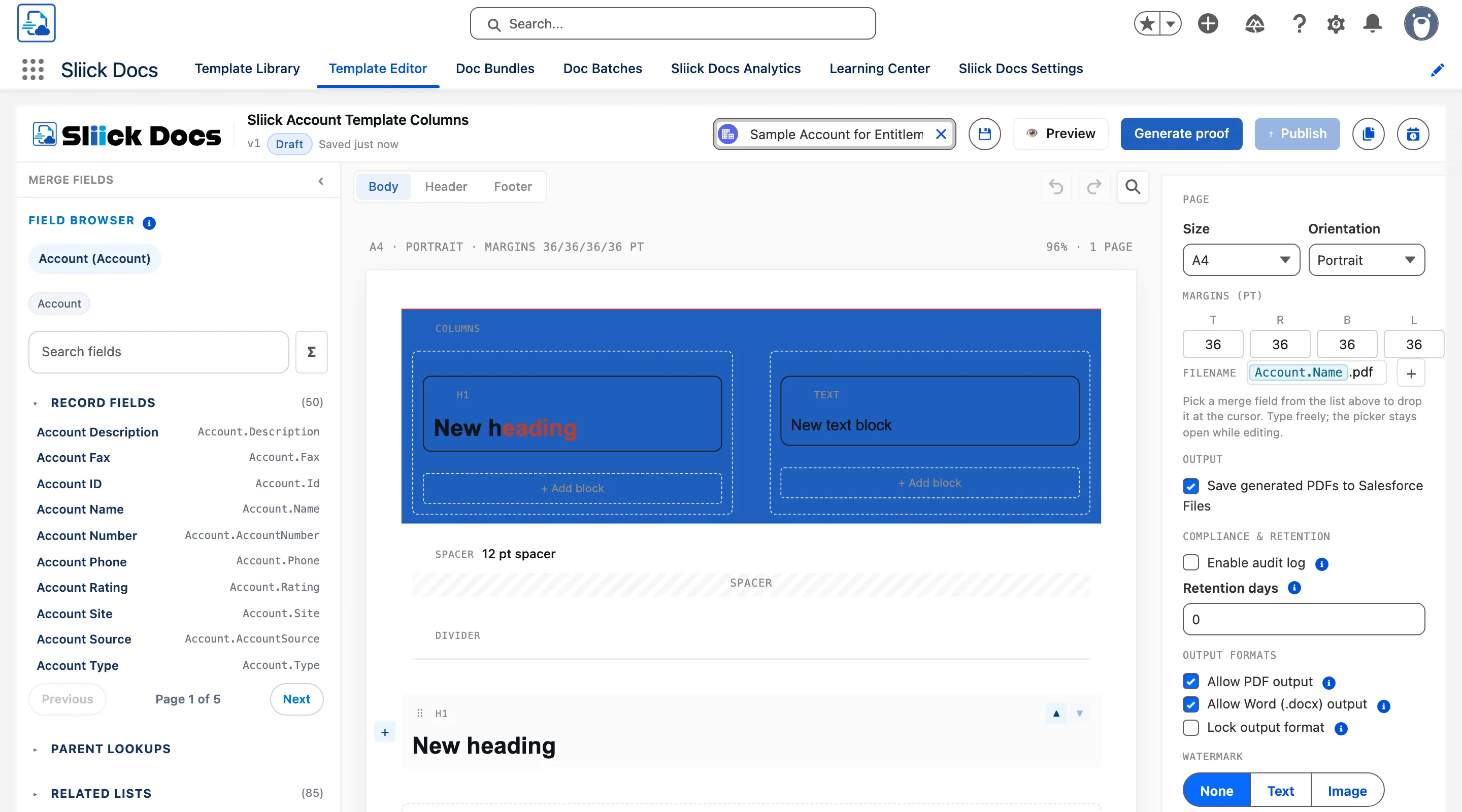
The two-column layout block has been generalised to a columns block supporting two or three columns with custom widths. Native stepper arrows on the width and gap inputs make fine-tuning quick, and column widths auto-redistribute to sum to 100% as you adjust any one of them (with a 10% minimum per column). The gap between columns is now configurable and renders dynamically on the canvas. Templates built with the old two-column block continue to work unchanged.
Promote templates between orgs
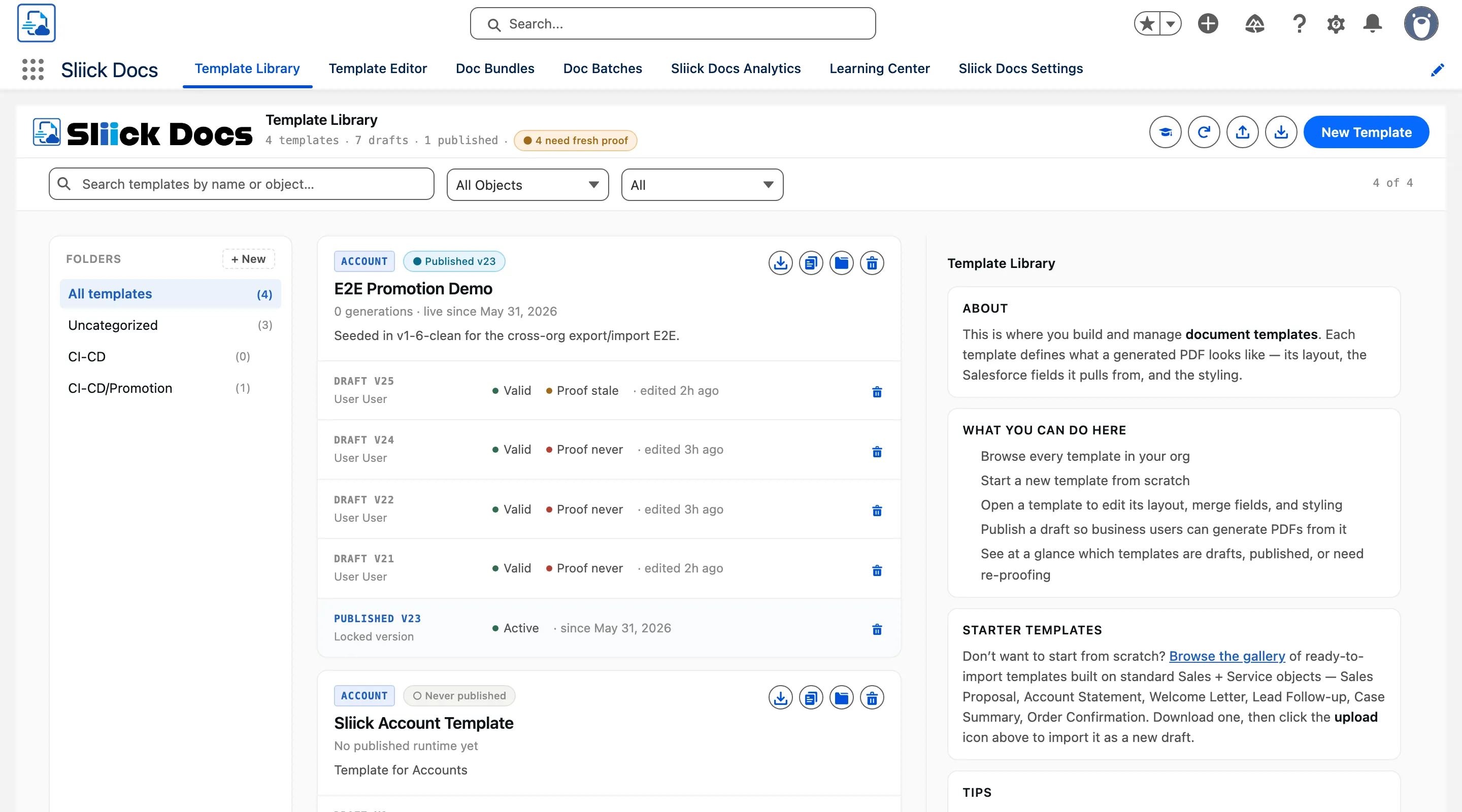
This is the operational headline of v1.6. A Sliick Docs template is data - it lives in custom object records, not in metadata - so no Change Set or SFDX deploy can move it. Until now, teams either rebuilt templates by hand in each org or relied on a paid release-management tool.
v1.6 adds native export and import directly in the template library. Select one or more templates (or a bundle), export to a .sdt archive - a compressed zip containing a manifest and one entry per template, version, and binary - and import into the target org. Each template and bundle receives a stable External_Id at creation that survives renames and org boundaries. Import matches on that identity, with four conflict policies - skip, update, duplicate, or fail - and a dry-run mode that previews the outcome without committing anything. Re-promoting the same template updates it in place (idempotent) rather than duplicating, which is the property that makes a repeatable promotion pipeline safe.
Templates land as drafts in the target org by default, so the receiving admin reviews and publishes deliberately. An optional “activate on import” toggle publishes them automatically if they pass validation, which suits teams with a repeatable promotion pipeline. Watermark images and other attached files travel with the export (with a graceful degradation path if an image exceeds the Apex heap limit), and folder structures are created automatically in the target. Org-specific references - EmailTemplates, Org-Wide Addresses, permission sets - are resolved to the target org’s equivalents during import.
Bundle display names now enforce uniqueness (parity with template names), so naming collisions are caught on save rather than surfacing as ambiguity during generation.
Themes and settings remain metadata and promote through the same Change Set or SFDX tooling admins already use for everything else. Portability covers the data tier that those tools cannot reach.
A 10-language user interface
The surfaces that non-admin users see - the document generator on record pages, the help pane, and Flow error messages - are now localised across ten languages: German, Spanish, French, Italian, Japanese, Korean, Dutch, Portuguese (Brazil), Chinese (Simplified), and Chinese (Traditional). Template content itself stays in whatever language the author writes it in; this is about the surrounding UI, so international teams see buttons, labels, and messages in their own language without any admin configuration.
Editor polish
A set of smaller improvements round out the authoring experience:
- Native colour pickers on border colour, block background, cell background, toolbar text colour, and toolbar highlight colour - replacing text-only inputs that gave no visual feedback.
- Proof format badges so each proof row shows whether it was generated as PDF or Word, with all newly generated proofs highlighted (not just the first). Full filename tooltips appear on hover.
- Cleaner block styling controls with border width, style, and colour stacked in their own rows for easier scanning. Corner radius is hidden since PDF output does not support it.
- Undo fix - the bottom “Add block” button now correctly pushes an undo snapshot, so undo is available immediately after appending a block from the page bottom.
- Faster column switching - reducing a columns block from three columns to two now takes effect immediately, with no confirmation dialog.
Starter templates refreshed for v1.6
The six built-in starter templates have been rebuilt to use v1.6 features instead of approximating them with v1.5 primitives. Customers downloading the gallery files now get enterprise-shaped output out of the box:
- Sales Proposal and Order Confirmation use real table blocks with row-level repeats over
OpportunityLineItems/OrderItems, a colspan-merged dark-band title row, a four-column grid with currency-aligned cells, and a merged subtotal row at the bottom. This replaces the v1.5 stacked two-column pattern where column edges could drift between rows in the PDF. - Account Statement includes a pipeline-snapshot table over
Opportunitieswith a colspan-merged total row. - Three-column status strips appear in Sales Proposal, Order Confirmation, Case Summary, and Lead Follow-up, replacing the v1.5 newline-packed text-block summaries.
- Welcome Letter uses an asymmetric 60/40 columns block so the sender block sits left and the date right-aligns flush on the same line (business-letter convention), saving vertical space.
- Lead Follow-up replaces a data-driven
listblock with a plain text block carrying bold numbered prefixes - same PDF render, no validator gate.
Upgrading
Sliick Docs v1.6 is live on the AppExchange. New installs get v1.6 directly.
A few notes for existing orgs:
- All v1.5 templates keep working unchanged. Headers, footers, table-row repeats, and flexible columns are additive - existing templates render exactly as before until you choose to use the new capabilities.
- The portability features are ready to use immediately. Existing templates receive their stable cross-org identity automatically.
- The starter templates in the gallery have been refreshed. If you previously imported a starter template and customised it, your customised copy is unaffected - only fresh downloads from the gallery pick up the v1.6 versions.
- No configuration, metadata, or integration changes are required.
If you would like a hand setting up a template promotion pipeline or designing a document with headers and line-item tables, get in touch.
Where to start
- Sliick Docs Complete User Guide - the full reference, updated for v1.6.
- Sliick Docs product page - feature overview and AppExchange install link.
v1.6 builds on the feedback customers shared after v1.5. We welcome more of it, and the next release is in design.