Sliick / Apps / Sliick Docs
On AppExchange · Native Salesforce Document Generation

Sliick Docs.

Reusable templates, theme-driven styling, conditional content, repeating sections, signatures, image merge fields, hyperlinks, watermarks, auto-email, Flow invocables, and signed PDFs. Entirely native LWC + Apex. No middleware, no storage indirection.

At a glance v1.0.0
Status Live on AppExchange
Native Lightning Web Component + Apex
Authoring WYSIWYG editor with theme, block styling, inline toolbar
Bulk Doc Batches console + 3 global Flow invocables
Pricing FREE

Sliick Docs turns your Salesforce records into polished PDF documents without leaving Salesforce. Admins design reusable templates in a drag-and-drop editor with theme-driven styling, drop in merge fields up to five lookups deep, render child collections as repeating sections, and preview the output with real data. Business users generate the finished PDF in one click from any record page; Flows generate them in bulk; and the auto-email pipeline routes the finished file to the right recipients automatically.

No Word documents. No external services. No data leaves your Salesforce instance. Just native, secure, version-controlled document generation built for the platform.

Read the Sliick Docs: Complete User Guide

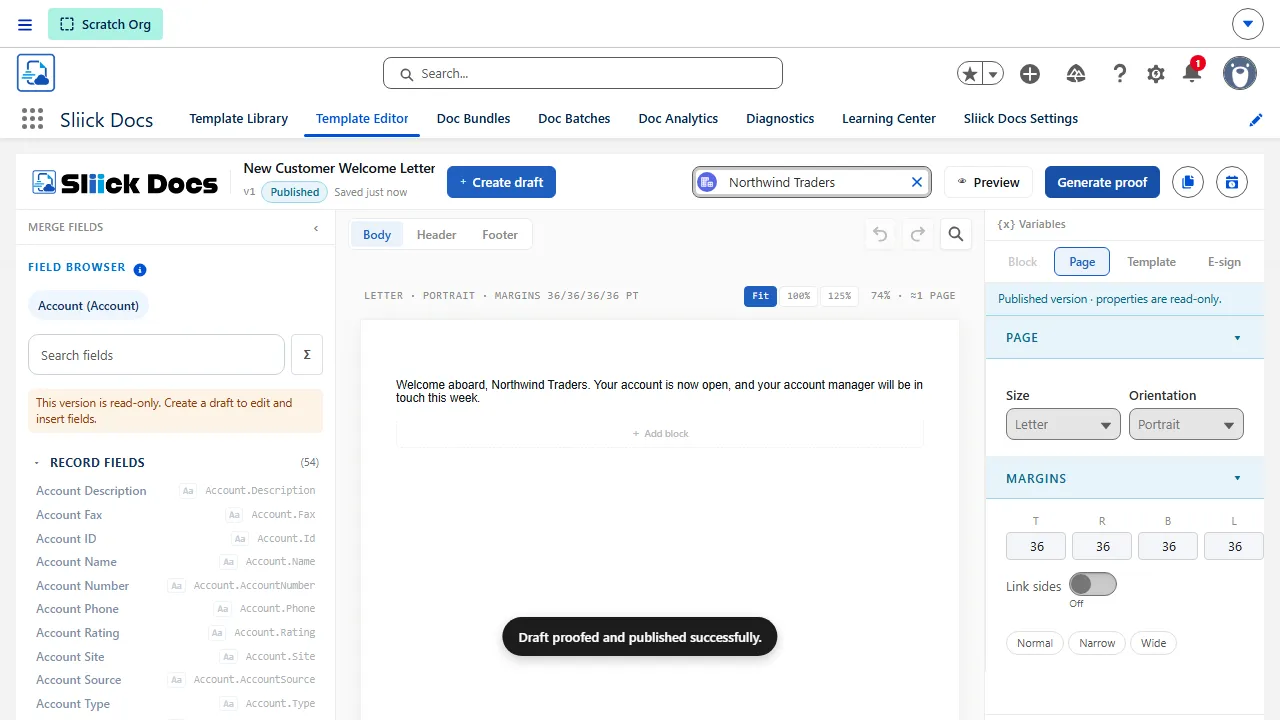
Sliick Docs Template Editor

Why teams choose Sliick Docs

  • Stay native and secure: All rendering uses the Salesforce native PDF engine. No third-party services, no data egress, no Remote Site Settings.
  • Reduce admin friction: Admins design templates visually in a WYSIWYG editor, with no Word documents to maintain or external tools to learn.
  • Theme once, restyle everywhere: Brand colours and spacing live in a single theme that every template inherits. Change the theme, republish, and every document picks up the new look.
  • Versioned by default: Every template change creates a new draft version. Publishing snapshots a new immutable release, so runtime output is always reproducible.
  • Trust the merge fields: Field discovery respects each user’s CRUD and field-level security. Inaccessible fields fail explicitly, never silently.
  • Generate at any scale: One click from a record page, async batches from the console, or fully automated from a Flow. The same engine drives every path.

Built for record-driven document workflows

Sliick Docs is at its best when documents are operational, not decorative. If your team produces the same kinds of documents repeatedly from CRM data, the standard Salesforce reporting and email tools rarely cover the gap.

Team or use caseWhat Sliick Docs improves
Sales operations and revenue opsGenerate quotes, statements of work, and order summaries directly from Opportunity or Order records.
Service and field operationsProduce work orders, service reports, and inspection summaries from any custom object.
Not-for-profit and member servicesCreate donation receipts, member letters, and grant acknowledgements without exporting data.
Education and accreditation programsIssue enrolment confirmations, completion letters, and program documents from student records.
Property and asset managementRender lease summaries, asset reports, and condition reports straight from the relevant Salesforce data.

Feature highlights

A WYSIWYG editor designed for Salesforce admins

Build pages visually with sections, callouts, headings, text blocks, dividers, spacers, tables, images, two-column layouts, signatures, repeating blocks, and conditional regions. The editor is a Lightning Web Component that runs inside Salesforce, so you stay inside the platform from authoring through to publishing.

Sliick Docs designer canvas

Theme-driven styling and an inline formatting toolbar

A single theme (Settings, Brand & theme) defines your brand colours, heading sizes, body size, and a three-step spacing scale. Block-level controls in the right rail expose background, per-side border, corner radius, line height, indent, and spacing presets. An inline formatting toolbar pinned above the canvas covers bold, italic, underline, strikethrough, font family, font size (6 to 96 pt slider plus presets), text colour, highlight, alignment, and line height. Colours can be picked as brand or theme references that resolve at compile time, so a theme change repaints every template the next time it is published.

Merge fields are first-class objects, not text replacements

Insert merge fields from the base object, any parent lookup up to five hops deep (Account.Owner.Profile.UserType.Name), child collections via Repeat blocks, or aggregate functions like SUM / COUNT / AVG over child relationships. Fields are stored as structured chips, not fragile placeholder strings, and a Format dropdown on each chip controls how the value renders at PDF time: raw, currency, number, percent, date, or datetime, all locale-aware against the running user.

Bring in any Salesforce image field (ContentVersion or URL) as a dynamic image merge field with configurable width and height. Wrap text or merge-field chips in hyperlinks, with merge-field placeholders allowed inside the URL itself (for example https://salesforce.com/{{Account.Id}}). Author bulleted and numbered lists from the block palette. Add a per-template watermark that renders on every page of the generated PDF.

Proof against a real test record before publishing

Pick a real Salesforce record as the test record for a template. Sliick Docs merges the live data, runs validation, and generates a proof PDF using the exact same code path as runtime. What you see in proof is what your end users will get.

Proof preview

Versioning and publishing built in

Every template has a draft version that admins edit freely. When you are ready, publish creates an immutable release snapshot and atomically points the template at it. Releases are never mutated, so the runtime output is always reproducible. Switching versions is just repointing a lookup. Bundles work the same way: a Doc_Bundle_Release__c freezes the active release of every member template so a bundle published today renders identically a year from now.

graph LR
    Draft[Draft Version] -->|Edit and Validate| Proof[Proof Generation]
    Proof -->|Test Record| PDF[Proof PDF]
    Draft -->|Publish| Release[Immutable Release]
    Release -->|Active Release| Runtime[Record Page Generation]
    Release -->|Bulk| Batches[Doc Batches Console]
    Release -->|Flow| Invocables[Flow Invocables]
    Runtime --> Files[Saved to Salesforce Files]

One-click generation from any record page

Drop the Sliick Docs Generator Lightning Web Component on any record page. End users see the templates available for that object, click generate, and the PDF is created and saved to Files against the record. No exports, no clicks-through-screens, no manual file naming.

Record page document generation

Bulk generation with the Doc Batches console

The Doc Batches tab submits and monitors bulk runs against a SOQL filter, a Salesforce Report (tabular reports up to 2,000 rows), or an explicit set of record IDs. Pre-flight Analyze runs a readiness verdict, counts the records, and offers a Spot-check sample to preview the merged output against a handful of records before you commit. Choose Individual, Combined PDF only, or Both for output mode. Combined runs assemble HTML snippets and call native PDF once. ZIP downloads are on-demand: synchronous up to 50 records, asynchronous above with a notification when the ZIP is ready. Retry-failed is drift-aware: if the template has been republished since the original run, the confirmation calls that out before re-running.

Multi-template Doc Bundles

A bundle is a named, versioned bundle of templates rendered together against a single source record to produce one combined PDF. Each member is added through an Add Template modal, ordered with up / down arrows, and marked Required or Optional. A per-item inclusion expression (same grammar as the conditional content block) decides whether a member is included for a given record at runtime. Publishing snapshots each member’s current active release into the bundle release’s Item_Manifest__c, so the bundle renders identically every time, even if member templates change later. A drift badge surfaces the moment any member template has been republished since the bundle was last published.

Auto-email after generation

Configure email-on-success per template. Pick a Lightning or Classic Email Template, a recipient field path on the base object (for example Owner.Email), an optional CC field, and an OrgWideEmailAddress for the From. When generation succeeds, Sliick Docs queues an async send, attaches the PDF, and writes an audit trail to every Job__c: Email_Status__c, Email_Sent_At__c, Email_Recipients__c, Email_Error__c. Generation failure and email failure are separated: a generated PDF whose email could not be sent still counts as Succeeded, and the batch rolls up to Partial Success so the failure is visible.

Flow integration through three global invocables

Three global Apex invocables make Sliick Docs callable from any Record-Triggered, Scheduled, or Screen Flow. All three return success=false and errorMessage on failure, so a calling Flow’s transaction is never halted by Sliick Docs.

  • Generate Sliick Doc (synchronous, single record)
  • Generate Sliick Docs (Bulk) (asynchronous, accepts templateId OR bundleId plus queryCondition, recordIds, or reportId)
  • Generate Sliick Bundle (synchronous, single record bundle generation)

Template and Bundle portability

Templates and bundles are Salesforce records, so Change Sets and SFDX deploy do not move them. The Library and the Bundles tab both ship Export and Import actions. Exports are JSON files that strip org-specific IDs (test record, auto-email recipient / CC / from-address / template). Imports auto-rename on collision, surface unresolved merge fields, and land as new drafts so the target admin re-validates and publishes deliberately.

Validation that catches problems before users do

Validation enforces supported fonts, well-formed merge fields, theme references, block-style bounds, and contract freshness so authoring problems surface in the editor, not in a generated PDF. Unresolved merge fields produce author-facing error messages instead of silent blanks.

Files saved against the record, with a full job history

Every generated document is written to Salesforce Files and linked to the source record. A Job__c record tracks who generated what, from which template release, against which record, the email outcome (if auto-email is enabled), and the parent batch (if it came from a batch). You get an auditable history with zero extra setup.

Security and architecture

Sliick Docs is built with a Salesforce-first security model:

  • 100% native rendering: PDF generation uses the Salesforce native PDF engine. No external rendering services, no Remote Site Settings, no Trusted Sites.
  • Sharing, CRUD, and FLS enforced everywhere: All controllers and services run with sharing. Every SOQL read (user data and package-internal) uses WITH USER_MODE, so FLS and sharing apply to the running user. There are no without sharing classes in the package.
  • No data egress: No data ever leaves your Salesforce org during authoring, proof, runtime, batch, or auto-email.
  • Least-privilege permission sets: Sliick_Docs_Admin for authoring and the batch / bundle consoles, Sliick_Docs_User for record-page generation, Sliick_Docs_Automation for Flow-runner / integration users that call the invocables.
  • Immutable releases: Published template and bundle releases cannot be mutated. Switching active output is a single-row repoint, fully auditable.
  • Audit fields are read-only by design: Email_Status__c, Job__c, batch counters, and release fields are written only by Sliick Docs’ own service classes.

Technical specifications

FeatureSpecification
Namespacesliick
API Version66.0
Component TypeLightning Web Component (LWC) plus packaged custom objects
Supported TargetsRecord Pages (end-user generation), App Pages (admin authoring and consoles)
RenderingSalesforce native PDF engine
StorageSalesforce Files (ContentVersion / ContentDocumentLink)
Automation3 global Apex invocables for Flow, plus Doc Batches console for bulk runs
DependenciesNone. No external libraries, services, or static resources

Quick installation

Get Sliick Docs into your Salesforce org in minutes:

  1. Install Sliick Docs from the AppExchange listing.
  2. Assign the Sliick_Docs_Admin permission set to admins, Sliick_Docs_User to end users, and Sliick_Docs_Automation to any Flow runner or integration user from Setup > Users > Permission Sets.
  3. Open the Sliick Docs app from the App Launcher and create your first template.
  4. Follow our Complete User Guide for step-by-step authoring, proof, publish, batch, bundle, and Flow instructions.

What implementation looks like

  1. Install Sliick Docs into your Salesforce org.
  2. Assign permission sets according to role.
  3. Set the org-wide theme in Settings (brand colours, heading sizes, spacing scale).
  4. Create a template against the base object you want to generate documents for, design the layout, drop in merge fields, pick a test record, proof, fix any validation issues, then publish.
  5. Add the Sliick Docs Generator component to the relevant record page so end users can generate documents in one click.
  6. (Optional) Configure auto-email on the template, or call Sliick Docs from a Flow for fully automated generation.

Teams can have a real, production-quality template live in their org on day one and a fully automated, bulk pipeline live by the end of the week.

Ready to bring native, secure, versioned, fully-automatable document generation into your Salesforce org?

Install Sliick Docs from the AppExchange

Upcoming roadmap

The current release (v1.0.0) covers the full authoring, single-record runtime, bulk, bundle, Flow, and auto-email surface. The following native-tier features are in active development:

Table design controls

Per-cell background colours, borders, padding, and alignment; drag-to-resize column widths; and a one-click row-striping preset for data-heavy tables.

Variables side panel

A slide-out panel listing every merge field used in the current template, with sample values resolved against the test record and a “find all” action that highlights each chip on the canvas.

Template duplicate and version diff

Save any template as a new draft with one click, and compare any two saved versions side-by-side to see exactly what changed between them.

Per-block context menu

Right-click any block to duplicate, move, cut, copy, paste, or delete it without leaving the canvas.

Starter template library

A growing catalogue of ready-to-use templates (Quote, Invoice, Offer Letter, Case Summary, and more) available to download from Sliick.com and import directly into your org via the existing import flow.

List view mass action

Select records from any standard list view and trigger a batch generation job without building a Flow.

CSV batch upload

Upload a plain CSV of record IDs in the New Batch modal to run a batch against any arbitrary set of records.

Analytics dashboard

A built-in dashboard showing generation volume, success rates, top templates, and top users - sourced entirely from your org’s own data.

Audit log

An optional per-template audit log that captures the exact merge values used in every generation, with a SHA-256 hash for tamper detection. Designed for regulated industries and compliance use cases.

Retention policies

Set a retention period on any template; generated files older than the threshold are automatically deleted from Salesforce Files, with per-record opt-out for files that must be kept longer.

Building for a specific document workflow? Contact us to discuss your use case and roadmap fit.

Other apps in the studio 04 apps
01 Sliick Photos icon
On AppExchange
Sliick Photos

Turn Salesforce records into visual workspaces.

View app →
02 Sliick Charts icon
Free & Open Source
Sliick Charts

Native Salesforce Data Visualization

View app →
03 Sliick Forms icon
Coming Q3 2026
Sliick Forms

Branded, conditional forms wired to Salesforce records.

Learn more →
04 Sliick Files icon
Coming late 2026
Sliick Files

Unified file management with previews, sharing, and BYO storage.

Learn more →