
Sliick Docs v2.5: The Chasing Release
Sliick Docs v2.4 was about evidence: making a signed document verifiable by the person who receives it. v2.5 is about the days between sending a document and getting it back.
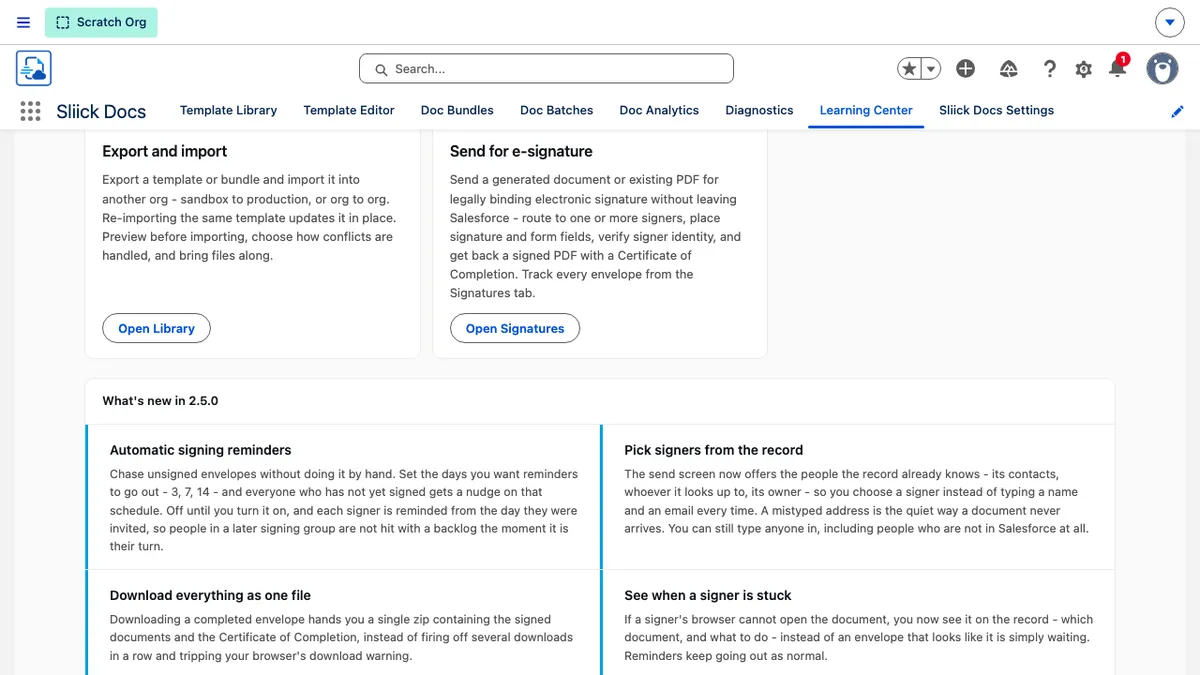
It is also the largest release since v2.0. The short version is in the app itself: the Learning Center now carries a What’s new in 2.5.0 panel, shown above.
This article gives a high-level overview of what has changed since v2.4. For the step-by-step reference, see the Sliick Docs Complete User Guide.
Signing reminders go out on a schedule
Set the schedule once and Sliick Docs does the chasing.
An administrator enters the days a reminder should go out, for example 3, 7, and 14, and everyone who has not yet signed or declined gets a nudge on that schedule. A few deliberate decisions sit behind it:
- It is off until you turn it on. Installing or upgrading to v2.5 sends nothing, and nothing runs in the background of an organisation that has not opted in.
- Turning it on takes a deliberate second step. Because switching it on starts emailing your counterparties unattended, Sliick Docs tells you exactly what will start happening and how many envelopes are already waiting, before you confirm.
- Each signer is reminded from the day they were invited, not from the day the envelope was sent. In a document that routes to signers in order, a later group gets its own clean schedule rather than a backlog of reminders the moment it becomes their turn.
- Reminders never interrupt someone mid-signature. If a signer is part-way through, that envelope is left alone and reminded once they are idle.
- Reminders stop at the right time. They never chase someone who has already finished, and they stop at expiry, cancellation, or completion.
Because the schedule runs unattended under a specific person’s permissions, Sliick Docs names that person on the settings screen and flags it if that user is later deactivated. Manual reminders work exactly as before.
Pick signers from the record
The send screen now offers the people the record already knows: the record itself when it is a person, whoever it looks up to, its owner, and the contacts hanging off it. You pick a signer instead of typing a name and an email address by hand.
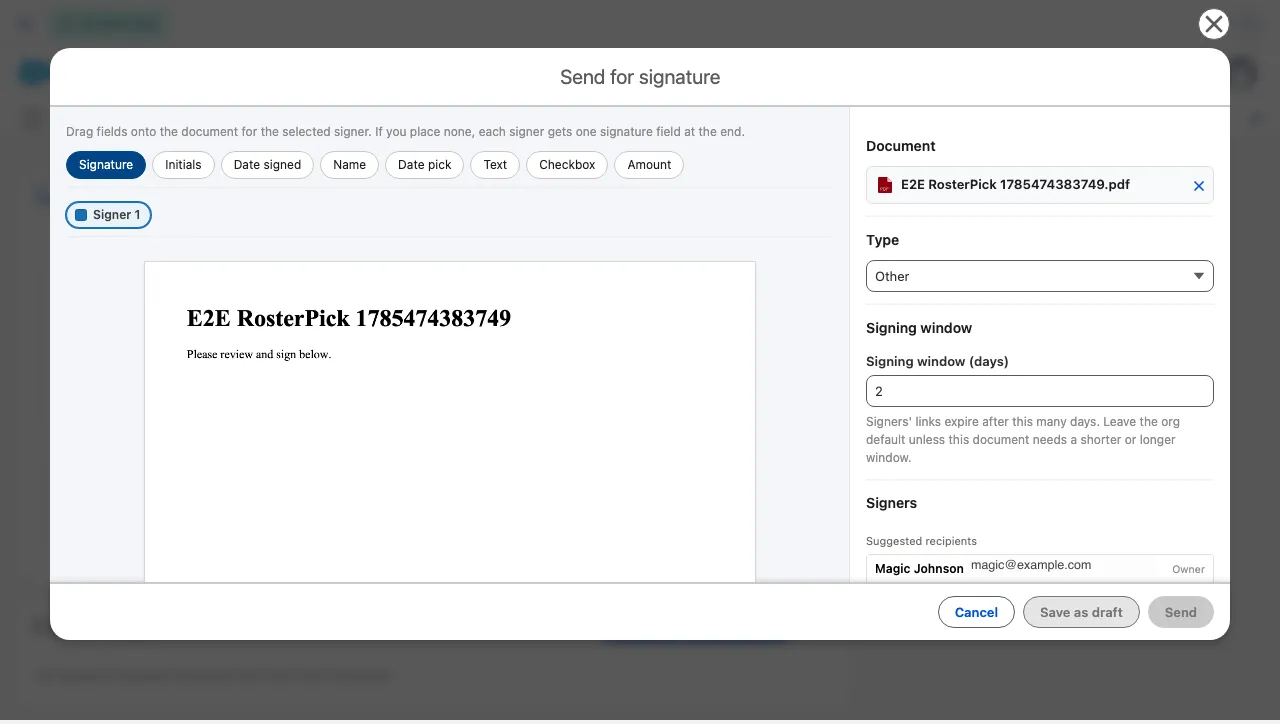
Two things this deliberately does not do. It never decides who signs for you: an account has many contacts, so the list is offered and a person chooses. And typing is untouched, so a counterparty who is not in your CRM at all remains a perfectly normal signer.
Picking someone also links the completed envelope to their contact record, so a person’s signing history becomes reportable in Salesforce like anything else.
For template authors, the signing-field designer offers the same picker when you map a signing role to a record field, so you choose the field rather than recall its name.
Download everything as one file
A completed envelope now downloads as a single archive containing every signed document and the Certificate of Completion. One file in your Downloads folder, named after the documents rather than an internal reference number, with no browser prompt about multiple downloads.
The signed documents inside are byte-for-byte identical to the originals. Downloading individual files, or the combined single PDF, works as before. Both the signer’s finish screen and the sender’s record card offer it.
See when a signer is stuck
If a signer cannot open a document, that now comes back to you. The record card shows which document is blocked and what to do about it.
The envelope stays valid, stays signable, stays cancellable, and reminders keep going out as normal, because a blocked document is a condition to fix rather than a new status to manage. Signers are told about an unavailable document when they arrive, rather than discovering it part-way through.
A signer who has been locked out of email code verification can also be let back in, with a per-signer action on the record and the locked-out state visible to you.
Multi-document envelopes signed as one envelope
If you send more than one document in a single signature request, v2.5 changes how that feels for the signer. They page through every document in the envelope, are moved on to the next one that still needs something from them, and see only the fields belonging to what is on screen.
In a document that routes to signers in order, a later signer sees the marks earlier signers have already made.
Every signed page now carries a short envelope reference in its header and margin, printed on the Certificate of Completion and on every copy of the document. It is not a secret, it is easy to read aloud to support, and it ties any page of any artifact back to the envelope it belongs to.
Larger documents on the premium plan
On the premium plan, signers are shown the document a page at a time, rendered on our side, and the signed document is assembled there too. Document size stops being the constraint, so scanned paperwork running to many pages is now a normal thing to send.
The free plan is unchanged in every respect: the signer’s own browser does the work, with the same behaviour, the same limits, and no dependency on anything outside Salesforce. Which plan an envelope uses is fixed at the moment it is sent, so changing plan never affects a signature that people are already part-way through.
Premium signing is a conversation rather than a checkbox. Get in touch if it is relevant to your organisation.
Clearer file names for generated documents
Leave the file-name box empty and generated documents are named after the record, the template, and the date and time. Repeat generations and different templates on the same record arrive as distinct files, in the app and anywhere the file is sent afterwards.
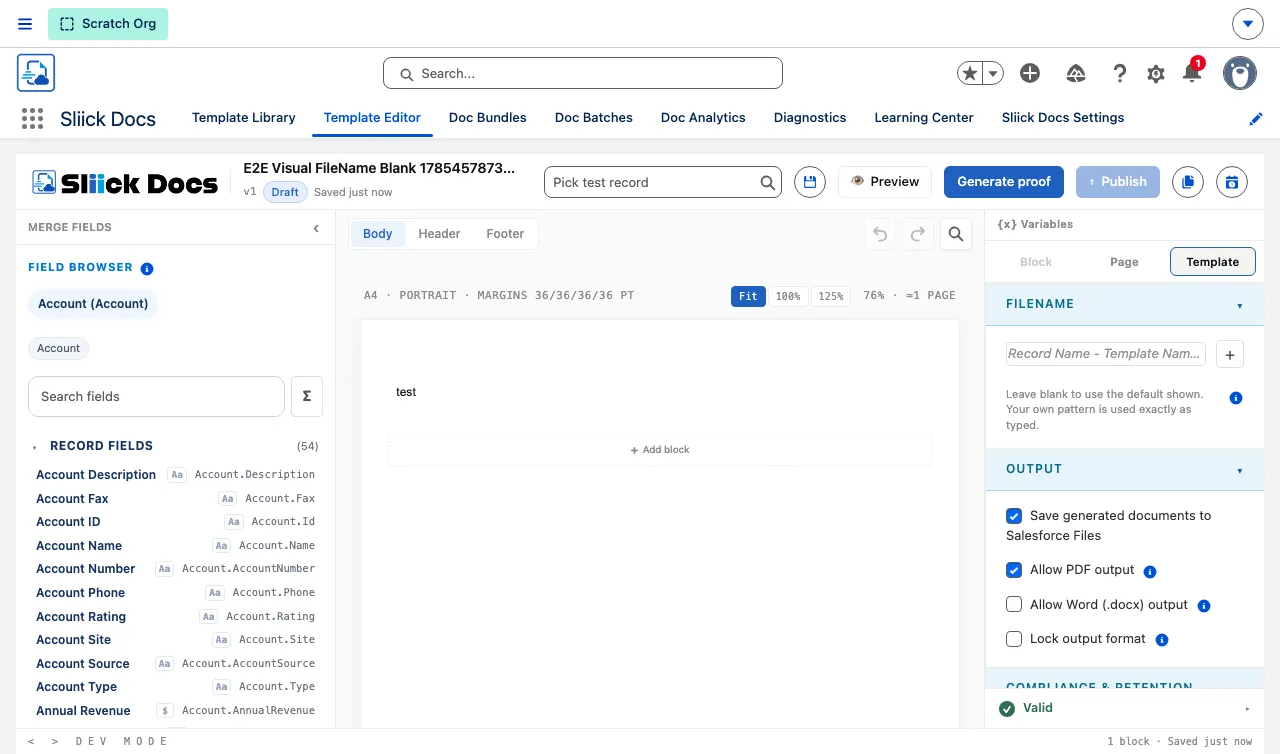
The default is shown as a greyed hint rather than filled in for you, so blank stays blank. If you prefer your own pattern, you can now drop the generated date, or the date and time, into it.
Smaller improvements worth knowing about
- Signature marks land where the signer put them across every page shape a real document has: scanned pages that arrive rotated, mixed portrait and landscape within one document, and unusual page geometry.
- Signing emails lead with the document name and the sender’s name, so a recipient can tell at a glance what has arrived and who sent it.
- A signed PDF reports Sliick Docs as its producer, rather than inheriting the properties of whatever produced the original file.
- Signed documents are re-checked nightly against the tamper-evident audit chain.
- Envelopes sent without a template can be given a retention window, set at organisation level. It is off by default, and enabling or shortening a window asks you to confirm exactly what will be deleted.
- Every settings card saves on its own, so a change in one area validates and saves independently of the others. Help text across Settings is roughly half as long, with the detail moved to the help pages.
- The batch console searches your reports rather than listing the first 200 alphabetically, and moving between the report and filter tabs keeps what you set up on each.
- Batch filters accept more of Salesforce’s own filter syntax, including fiscal date ranges and standard functions, and a rejected filter explains what to change.
- A failed proof explains itself in plain language, naming the validation rule, the missing merge field, or the missing permission.
- The certified seal is applied within seconds of the last signature, so a signer usually leaves with their final copy on screen, and the completion email goes out sooner.
Upgrading
Sliick Docs v2.5 is live on the AppExchange. New installs get v2.5 directly.
- Everything from v2.4 carries forward unchanged. Your templates, bundles, batches, branding, and settings continue to work exactly as before.
- Automatic reminders are off. Upgrading sends nothing to anybody. Turn them on when you are ready, in Settings.
- Retention for envelopes sent without a template is off. Upgrading deletes nothing.
- The signing, naming, and settings improvements apply automatically. There is nothing to configure.
- If you use your own file-name patterns, they are untouched. Only the blank default changed.
Where to start
- Sliick Docs Complete User Guide - the full reference.
- Sliick Docs v2.4 - public document verification and a fuller Certificate of Completion.
- E-Signature in Sliick Docs: The Story, the Law, and the Tick - the background on evidence and certificates.
- Sliick Docs product page - feature overview and AppExchange install link.
If you would like a hand setting up automatic reminders or working out whether premium signing is worth it for your document volumes, get in touch.