
Sliick Forms v0.8
Sliick Forms v0.8 is live and free on the AppExchange. This is the release that lets you send a form to one person with their own details already in it.
Every version, including the v0.7 work on person accounts, mapping and exports, is in the release notes.
The theme of v0.8 is getting a form to the right person already filled in, and letting them finish it later without losing anything or paying for it twice. Alongside that, a new permission set separates the people who work responses from the people who build forms, publishing a form for the first time became one screen, and a Display Text block can now hold a full privacy notice.
Send one person a link that is already filled in
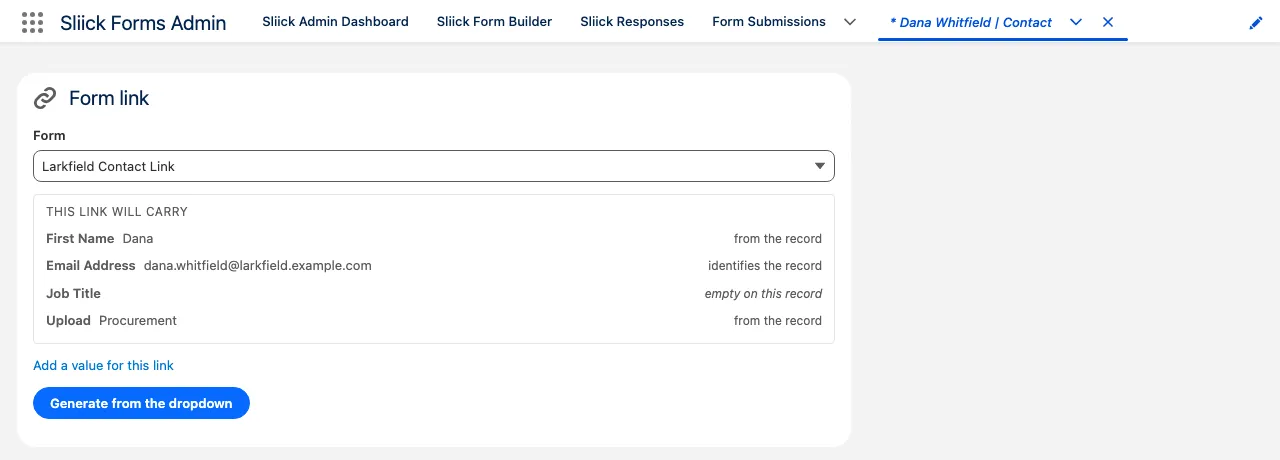
This is the biggest change in v0.8. Staff can generate a personalised link from any record: from the record page, from a Flow, or from Apex. It opens the form with that record’s values already in it.
You see what the link will carry before you create it. Pick the form from a list filtered to the forms that map this record’s object, and the panel shows one line per field straight away: the value read from the record, which field identifies the record, and which fields are empty on it so the respondent will fill them in. One click still creates the link.
Add a one-off value for this link alone. Open the drawer, pick a field, type a value, and it overrides whatever the record holds, or fills in a field the record does not map at all. Nothing is written back to the record, and the field that identifies the record cannot be overridden, because changing it would point the response at somebody else.
Any question can be held back. Tick Never prefill this field in the builder and that question is left empty whenever a form is filled in from a record: on a link, on the record page button, and on an internal record-driven placement alike. It does not affect save-and-continue, so a respondent’s own saved answers always come back.
Four things to know before you send one:
- It expires in 7 days, and the panel tells you the date.
- It is spent when the form is submitted. Reopening it afterwards says the answers arrived rather than showing them again.
- There is one live link per form per record, for the whole org. Generating again replaces the previous one, which stops working immediately.
- The values are not in the URL. They are stored in your org, and the link carries only a signed reference, so nothing about the record is readable from browser history, a proxy log, or a screenshot of the address bar. It is still a bearer link: anyone who opens it sees the values, so send it the way you would send anything else about that person.
Flow’s Create Sliick Form Record Link action and FormsApi.invoke('createRecordLink', ...) take the same per-link typed values, so a scheduled Flow can send a hundred people a form each already carrying what you know about them. The Flow action never throws: one refused record costs the rest of the collection nothing, and you branch on an error code.
Your Salesforce admin adds the packaged Sliick Form Record Link component to a record page, optionally naming the form it should link to. Full walkthrough: Record links.
Staff who work responses, but do not build forms
A case worker sending out links and working the answers that come back does not need the form builder, and until now the only way to give them the responses console was to make them a full admin.
Assign the new Sliick Forms Operator permission set instead. An Operator can search responses, inspect the dry run, correct answers, process and retry, export the CSV, see the results and funnel panels, and generate record links. They cannot create, edit, publish or delete a form: there is no Admin Dashboard and no Form Builder.
Read this before you assign it. Working responses needs broad access to them. Salesforce only lets someone edit a record they do not own under Modify All, and Modify All cannot be granted without Delete. An Operator can therefore read, correct, process and delete every staged response in the org, not only the ones they work with. Assign it to people you would trust with the responses themselves. If that is more than you want, Sliick Forms User stays read-only with no console.
Save-and-continue, made honest
Every item here is a way the old flow could cost a respondent their answers, or cost a form a response against its cap.
- Saving opens its own page, carrying the link, a Copy button and a Back to the form button that returns the respondent to their answers. The form and its Submit button are off screen for the whole save, and Save and Submit can no longer race each other: each is unavailable while the other is going through.
- Saving again updates the link you already have instead of minting a second one, so the link a respondent copied keeps opening their latest answers. Submitting spends every copy of it.
- Submitting immediately after saving reliably spends the link. Pressing Submit a second or two after saving used to leave a link that reopened showing every answer on a form that looked unsubmitted, and submitting again consumed a second response.
- A spent link says the answers arrived, rather than claiming the link expired and inviting the respondent to fill the form in again.
- Reopening a form with a saved link always reaches a definite answer within about eight seconds, instead of sitting on “Restoring your saved answers…” indefinitely. Reopening after submitting no longer stages the response twice, and reopening a link that arrived complete no longer submits the form by itself.
- The expiry notice goes away. It can be dismissed and clears by itself at the next page or the review screen, rather than sitting above the summary of answers the respondent has just typed.
- Submit another response starts completely fresh, and is no longer dropped as a duplicate of the first.
Both the Salesforce-hosted and edge-hosted forms now say “We restored your saved answers” when a saved link is reopened, and the Start over button is gone. To begin a fresh response, open the form without the link.
Long privacy notices belong on the form
Display Text blocks hold long-form content and understand richer Markdown: paragraphs, bullet and numbered lists, headings, and mailto: links alongside bold, italics and web links. A GDPR disclaimer or a privacy notice, with a link to your policy page and a contact address, can go directly on the form, and the builder previews the formatting as you write.
Content too long to save is refused with an explanation, rather than a raw Salesforce error with your own text quoted back at you. CSV exports no longer carry empty columns for headings, paragraphs, images and other blocks respondents never answer.
Publishing a form for the first time is one screen
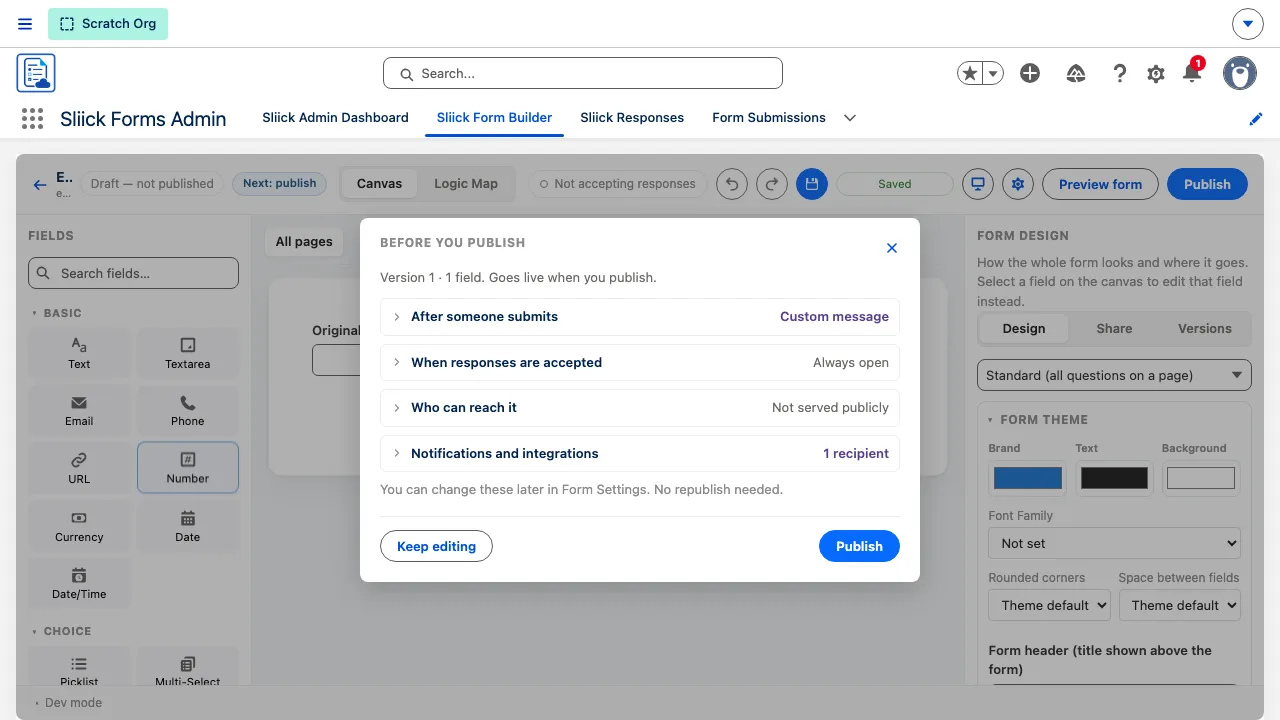
A first publish used to be a five-step walk. It is now a single screen: the message respondents see, when the form accepts answers, how records will link, and whether the form is served at your public address, each stating its current value so an author who opens nothing has still read what publishing will do. A checklist clears as you answer. Republishing is unchanged, with an option to review those settings.
Rounded corners and Space between fields are now chosen by name: Square, Subtle, Rounded, Very rounded, Pill, and Compact, Comfortable, Roomy, instead of a number in rem. A custom CSS length is still available under Custom. Forms also draw a subtle outline, and the corner setting now shapes the answer boxes too, so it has a visible effect on every form rather than only those using Sections or Repeating Groups.
Fixes worth calling out
- An admin whose permission set predates a packaged field can open the Form Builder again. The whole settings load used to fail, so the object-model section vanished and the public-address box showed unticked over a stored on, which is indistinguishable from a product bug. The builder now loads every column that admin can read and names the ones it cannot, with the remedy.
- Processing no longer reports success for a result it could not record. Where someone could create the target records but not write to the response itself, the records were created while the response stayed on Received with no note of what it made, so the console offered to process it again and doing so created the records a second time. This was reachable only where a permission set or profile grants Edit on responses without Modify All; Sliick Forms Admin and Sliick Forms Operator were never affected.
- The builder no longer offers to restore unsaved edits left behind before someone else changed the same form. Restoring them would have deleted questions added in the meantime.
- Preview asks before showing you a stale form, offering to save first or to preview the last saved version, and never discarding what is on the canvas either way.
- Fields can no longer be named after a link parameter the public form reserves. Three such names were missing from the check, so an admin could create a field that silently never filled from the link.
Upgrading
Sliick Forms v0.8 is live and free on the AppExchange. New installs get v0.8 directly, and your forms, mappings, published versions and responses carry forward unchanged.
If your admins hold a permission set you created yourself rather than the packaged Sliick Forms Admin, there are two grants to add:
- Read and Edit on
Form Element -> Content, the new long-form Display Text field. Without it, the Form settings object-model section and the edge-consent tick can read wrongly for those admins. - Read, Create and Edit on
Form Partial, which is where a record link’s resolved values are stored.
The packaged sets are updated automatically, which is the reason to assign them rather than clone them. See Upgrading the package.
Every form gains a faint outline in v0.8, and its inputs move from the platform’s default corner radius to the theme’s, including forms whose author never opened the theme panel. Nothing else about how an existing published form looks to respondents has changed.
Where to start
- Install Sliick Forms free from the AppExchange.
- Sliick Forms documentation for the full reference, updated for v0.8.
- Record links for the new personalised links, end to end.
- Install and permission sets before you assign Sliick Forms Operator.
- Release notes for every version, including everything in v0.7.
- Book a walkthrough if you would prefer a demonstration.
Send feedback, gaps and requests to support@sliick.com. The product runs production intake today, and what arrives in that inbox decides what goes into 1.0.