
Record links: send a form already filled in
A record link opens one of your forms already filled in from one Salesforce record. Staff generate it from the record itself, send it to the person it is about, and the answers come back onto that same record.
It is the one prefill mechanism in the product. The values are not in the URL: they are stored in your org and the link carries only a signed reference, so nothing about the record is readable from browser history, a proxy log, or a screenshot of the address bar.
It is still a bearer link. Anyone who opens it sees the values. Send it the way you would send anything else about that person.
The four rules that govern every record link
Section titled “The four rules that govern every record link”However you make one, the same rules apply:
| Rule | Detail |
|---|---|
| It expires in 7 days | Not configurable. The panel tells you the date |
| It is spent when the form is submitted | Reopening it afterwards tells the respondent their answers arrived, rather than showing them again |
| One live link per form per record, for the whole org | Generating again, from anywhere, by anyone, replaces the previous one. The previous one stops working immediately |
| Regenerating discards saved progress | The new link starts from the record’s current values. If someone is part-way through, wait rather than regenerate |
From a record page
Section titled “From a record page”Your Salesforce admin puts the packaged Sliick Form Record Link component on the record page. Staff then press the generate button and get the link plus its expiry, with a Copy button.
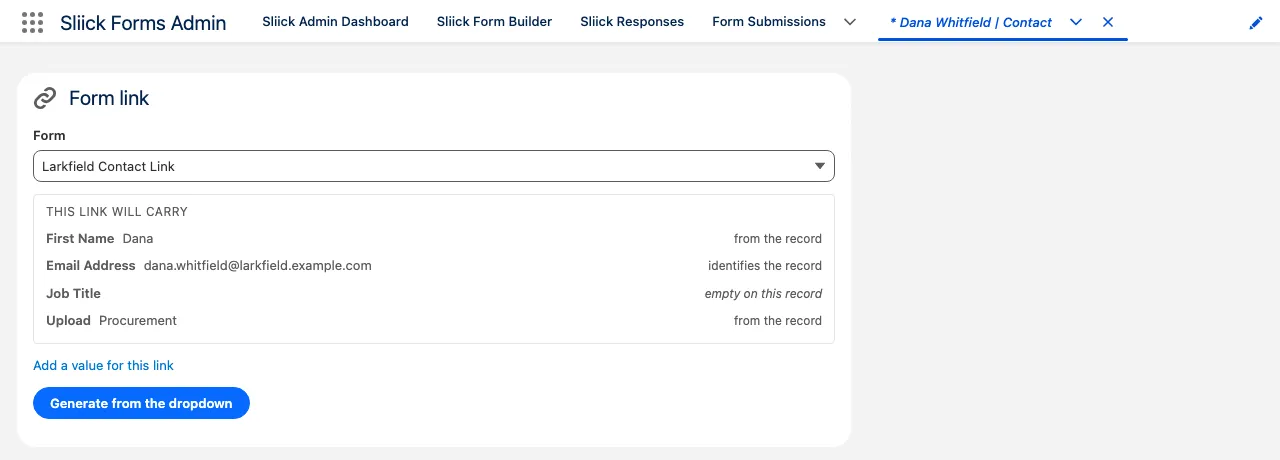
The button’s label is set by whoever added the component, so yours may not read Generate link. The panel above is on a page whose admin named it for the form it mints.
If the admin pointed the component at one form, it shows that form’s name. If they left it blank, staff get a dropdown of the forms that map fields on that object, and choosing one shows the preview straight away.
Adding the component (an admin does this once per object):
- Open a record of the object you want.
- Setup (gear), then Edit Page.
- Drag Sliick Form Record Link from the Custom components list onto the page.
- Optionally set Form External ID to the form the button should link to. It is shown in Form Builder, Settings. Leave it blank and staff choose the form themselves. Optionally set Button Label so one page can carry several of these, one per form.
- Save, then Activation if this is a new page.
Anyone using the button needs Sliick Forms Operator or Sliick Forms Admin. See Install and permission sets.
A Quick Action instead of a page component is yours to create rather than ours to package, because the action has to name your object. Make a Lightning Component action pointing at the same component if you would rather have it in the action bar.
From the builder
Section titled “From the builder”The Form Builder’s Share tab has a Create prefill link panel. Pick the object, then pick the record by searching for it by name: the search is scoped to the objects the form maps, so there is no record ID to paste.
Press Generate and copy what appears. If the form has a public address you get the whole URL; if it does not, you get the ?sliickPrefill=... parameter to append to wherever you placed the form.
What the preview tells you
Section titled “What the preview tells you”Before you generate anything, the panel shows one line per field. Each line says where its value came from:
| The line says | What it means |
|---|---|
| from the record | The value read off the record, which is what the respondent will see already filled in |
| empty on this record | The field is blank on the record, so the respondent fills it in |
| identifies the record | The matching field. This is what tells the form which record to update |
| typed for this link | A one-off value you added below |
Add a one-off value for this link
Section titled “Add a one-off value for this link”Open Add a value for this link, pick a field, type a value, and press Add. It appears in the preview marked typed for this link and overrides whatever the record holds. It can also fill in a field the record does not map at all.
It applies to that one link. Nothing is written back to the record.
The matching field is not offered, because changing it would point the response at a different record.
Leave a field out of every link
Section titled “Leave a field out of every link”In the builder, select the field and tick Never prefill this field, under its mapping. That field is then left empty whenever a form is filled in from a record: on a link, on the record page button, and on an internal record-driven placement alike.
It does not affect save-and-continue. A respondent’s own saved answers always come back. See Save-and-continue.
The option is greyed out on a matching field, for the same reason the drawer will not offer it.
From a Flow
Section titled “From a Flow”The invocable action is Create Sliick Form Record Link, under the Sliick Forms category.
- Inputs:
formExternalIdandrecordId, both Text, plus an optionalvalueOverridesJson. - Outputs:
success,url,expiresAt(a Date/Time you can bind straight to a field),errorCodeanderrorMessage. valueOverridesJsoncarries the same one-off typed values the panels offer: a JSON object of field API name to value. Build it in a Text Template set to Plain text, because rich text encodes the quotes.- It never throws. One refused record costs the rest of the collection nothing, so branch on
errorCode. - Bulk has a ceiling and it says so. Each link reads the record it seeds from, so a large collection comes back with
BATCH_TOO_LARGErather than a governor exception that would kill the interview. Roughly ten to twenty per interview is comfortable.
From Apex
Section titled “From Apex”sliick.FormsApi.invoke('createRecordLink', ...) is the in-org Apex call. It runs as the calling user, so it seeds only what that user can already read on the record. The parameters, the response shape and every refusal code are on The Sliick Forms REST API.
When the button refuses
Section titled “When the button refuses”The message names the remedy:
| The message says | What to do |
|---|---|
| No forms available | No form maps a field on that record’s object. Add mappings in the Form Builder |
| No public address | Set the org’s address on the Admin Dashboard’s Delivery panel, or give the form its own Share URL. See Sharing a form |
| Nothing to prefill | No field on that form maps to a field on that object |
| Not accepting responses | The form is paused, outside its schedule, or at its response cap. See Accepting responses |
| No permission | Assign Sliick Forms Operator or Sliick Forms Admin |
A form that has not been published yet tells you to publish it first, because a link against an unpublished form returns nothing.
What a record link does not do
Section titled “What a record link does not do”Only mapped fields can be prefilled, because prefill reads the record through each field’s mapping. An unmapped question is always blank, unless you type a value for that link.
On a form placed inside Salesforce, the person viewing needs read access to the record and its fields. Record-driven prefill on an internal placement is for signed-in respondents, not anonymous visitors.
A field filled straight from the page link is a different thing. That is per-field, opt-in, and described under Sharing a form. A record link always takes priority over it.