
Sliick Docs V1.0: Generally Available
When we promoted Sliick Docs v0.9.0 to the AppExchange a few weeks ago, we were honest about the shape of it: a clean, opinionated MVP. One-click PDF generation from any record page, a WYSIWYG editor for admins, native Salesforce rendering, no data egress. Good enough to use in production, but a deliberately small surface.
v1.0.0 changes that. The same secure, native foundation, but admins can now author much richer documents, end users can run them in bulk, automation can trigger them from Flow, and the result can email itself to the right person without anyone touching a button.
This article is a tour of everything that landed between v0.9.0 and v1.0.0. If you want the step-by-step admin walkthrough, see the Sliick Docs Complete User Guide.
In a sentence: v0.9.0 generated a PDF. v1.0.0 generates every PDF your business needs, on a schedule, to the right inbox, from a theme your brand actually owns.
Authoring: from text and tables to a real design system
A theme that the whole org inherits
A new Brand & theme panel under Settings holds your organisation’s palette: brand primary, secondary, and accent colours, default body and heading sizes, and a three-step spacing scale. Every template that references brand.primary or theme.headingColor automatically inherits these values - and re-publishing a template re-paints it against the current theme. Past releases keep the theme they were published with, so historical PDFs stay reproducible after a rebrand.
This is the difference between “every admin picks their own hex code” and “the marketing team picks a hex code once and every document follows.”
An inline formatting toolbar that finally feels like a real editor
In v0.9.0, formatting was block-level: pick a Heading or Text block and that was your styling. v1.0.0 adds an inline formatting toolbar pinned above the canvas whenever a styleable block is selected. The full set:
- Bold, italic, underline, strikethrough (with
Cmd / Ctrl + B / I / Ushortcuts) - Font family (the four fonts the Salesforce native PDF engine supports)
- Font size from 6 pt to 96 pt, by typing a value or using the slider
- Alignment, line spacing
- Text colour and highlight, picked from brand swatches, theme references, or hex
Two modes admins immediately reach for: highlight a range first and apply marks to it, or with no selection click B to arm bold and have the next characters you type come out bold. The two-mode behaviour is the difference between an editor that gets out of the way and one that fights you.
Block-level styling for layout that actually matches the brief
Every styleable block now exposes a Block style panel in the right rail:
- Spacing per side (above / below / inner top / inner bottom)
- Background colour, picked from theme swatches or hex
- Per-side borders with width, style, and colour
- Corner radius (0 to 16 pt)
- Line height
- Indent
Pair this with the theme system and you get hex-code-free, brand-consistent documents that survive a re-branding exercise.
A Callout block, lists, and watermarks
Three smaller authoring additions worth calling out:
- Callout block - a section variant with a tinted background and a coloured left bar. Perfect for the “Important” or “Read this first” frame that every legal or onboarding document has.
- Bulleted and numbered lists - finally first-class blocks. Merge fields work inside list items, so a list of related Contacts or Opportunities is now one block, not five.
- Per-template watermarks - text, colour, size, and opacity, rendered on every page of the generated PDF. Useful for
DRAFT,CONFIDENTIAL, or a document-classification label that has to appear on every page automatically.
Merge fields: structured, deep, and finally locale-aware
Format dropdown on every merge field
The single most-asked-for feature: every scalar merge-field chip now carries a Format dropdown alongside its fallback input.
| Format | Example (Opportunity.Amount = 12345.6, en-AU) |
|---|---|
raw (default) | 12345.6 |
currency | $12,345.60 |
number | 12,345.6 |
percent | 12.5% |
date | 18/05/2026 |
datetime | 18/05/2026, 14:32 |
The formatter is locale-aware (it uses the running user’s locale and the field’s currency ISO code), and the chip’s underlying value is untouched, so the same chip in a URL stays raw while the same chip in a sentence reads “$12,345.60”. No more piping field values through formula fields to get a currency symbol on a PDF.
Image merge fields
Any Salesforce file or URL field can now render as an image at PDF time. Click the chip, tick Render as image, set the width and height in points. Bound the field to a ContentVersion Id (a Salesforce File) or a direct URL and the chip resolves to an <img> in the rendered document. Useful for logos, signatures, profile photos on member cards, asset photos on inspection reports - any image that lives on the record.
Image chips work the same way inside Repeat blocks too, so a list of Contacts each renders with its own photo, not a static placeholder.
Hyperlinks with merge-field tokens inside the URL
Wrap text or merge-field chips in a hyperlink via the inline toolbar. The URL itself can contain merge-field tokens, for example https://salesforce.com/{{Account.Id}}. At runtime the tokens resolve per record, so the same template generates a link to each customer’s own Salesforce record without any per-document work.
5-hop parent lookups (up from 1)
v0.9.0 supported one hop of parent traversal, for example Account.Owner.Name. v1.0.0 takes that to five, for example Account.Owner.Profile.UserType.Name. The deep lookups work both at root scope and inside a Repeat block, so a quote line item template can reach OpportunityLineItem.Opportunity.Account.Owner.Profile.Name without a workaround.
Aggregate merge fields
A new chip type that computes SUM, COUNT, AVG, MIN, or MAX over a child collection of the base object, with optional formatting. The aggregate runs as a single query per relationship, so the cost stays predictable even with hundreds of child rows. Total opportunity amount on an account summary, number of completed lessons on a student transcript, average satisfaction score on a service report: all single-chip drops in the editor.
Doc Batches: bulk generation, finally
This is the headline capability that pushed the version from 0.x to 1.0.
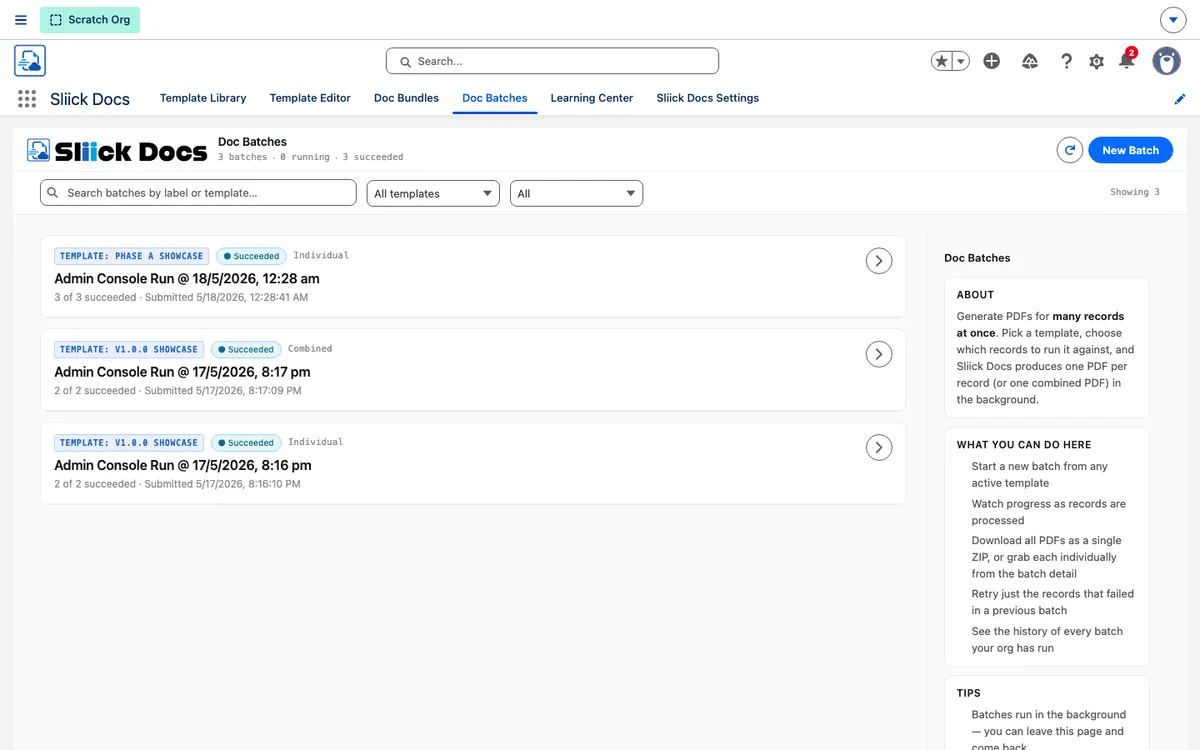
The new Doc Batches tab lets an admin (or a Flow) generate PDFs for many records at once. You pick a source (a SOQL filter, a list of record IDs, or a tabular Salesforce report), pick an output mode (one PDF per record, one combined PDF, or both), and submit.
What v1.0.0 ships with:
- Pre-flight analyzer. Before any work begins, Sliick Docs reports record count, template readiness, and (for Combined mode) a size estimate against the platform’s async heap limit. No surprises mid-run.
- Spot-check sample. Click Preview sample from the verdict to render up to five sample records before committing the rest. Catch merge-field problems before generating 500 PDFs, not after.
- Three output modes. Individual files saved per record, a single combined PDF stitched together, or both at once.
- Async by design. Batches run in the background; you can close the page and come back. Status polls every 5 seconds. A Custom Notification fires when the batch finishes.
- On-demand ZIP downloads. Synchronous up to 50 records, asynchronous above with a notification when the ZIP is ready.
- Retry-failed with drift awareness. When a batch ends as Partial Success, expand the row and click Retry failed to re-run only the failures. If the template’s active release has changed since the original run, the confirmation calls that out so the operator can decide whether to retry against the original or the new version.
- Per-template concurrency cap. Up to three active batches per template (or per bundle) at once, so async resources stay predictable.
The platform ceiling is 50,000 records per batch (a Salesforce limit), and a single batch produces one job record per record so there is a complete audit trail of who ran what, when, and what came out.
Doc Bundles: stitch several templates into one PDF
A new Doc Bundles tab lets you combine multiple templates into a single combined PDF rendered against one source record. The classic example is a sales bundle: a cover letter, the quote itself, the terms and conditions, and an optional NDA addendum, generated together as one document.
Bundles share the same versioning model as templates:
- Each bundle anchors to one base object; every member template must share it.
- Items are ordered with up / down arrows and marked Required or Optional. Required means the bundle fails if the template is inaccessible; Optional means soft-skip and continue.
- Each item can carry a per-item inclusion expression (same grammar as Show if blocks). Items that evaluate to false are silently skipped from the combined PDF.
- Publishing freezes the current active release of every member template into an immutable bundle release. The bundle renders identically every time, even if member templates are later republished.
- A yellow Members updated badge surfaces drift the moment any member template is republished, with a one-click action to re-snapshot the current members.
Bundles can be generated from a record page, from the Doc Batches console (bulk), or from the Generate Sliick Bundle Flow action.
Auto-email: the document arrives in their inbox
Configure email-on-success per template via six fields on the Template record:
| Field | Purpose |
|---|---|
| Auto Email Enabled | Master switch. |
| Auto Email Template Id | A Lightning or Classic Email Template. |
| Auto Email Recipient Field | A field path on the base object, for example Owner.Email. |
| Auto Email Cc Field | Optional CC path. |
| Auto Email From Address Id | An Org-Wide Email Address used as the From address. |
| Auto Email Save As Activity | Logs sent emails as Activities on the source record. |
When generation succeeds for a record (single or batch), Sliick Docs sends the email automatically. The subject and body come from your chosen Email Template with full merge-field support against the source record; the generated PDF is attached.
Every record’s job carries a full audit trail: status (Sent / Failed / Skipped), timestamp, the actual addresses that resolved at send time, and the failure reason when relevant. Importantly, a generated PDF whose email could not be sent still counts as Succeeded (the document exists, the file is saved); the email failure is tracked separately so neither failure mode masks the other.
Three Flow actions: generation as a building block
Sliick Docs now ships three Flow actions usable in Record-Triggered, Scheduled, and Screen Flows:
| Action | When to use it |
|---|---|
| Generate Sliick Doc | Single record, synchronous. Returns the job and the saved PDF. |
| Generate Sliick Docs (Bulk) | Many records, asynchronous. Accepts a template or a bundle. Returns the batch id. |
| Generate Sliick Bundle | Single record, synchronous, multi-template. Returns the job and the combined PDF. |
All three are designed to never throw. Failures are returned cleanly as success=false plus an errorMessage, so your Flow can branch on the outcome rather than halting the whole transaction. A new Sliick_Docs_Automation permission set gives the Flow running user (or a dedicated integration user) just enough access to run document generation, with no broader “View All / Modify All” rights.
Three common automation shapes this unlocks straight away:
- Auto-on-state (Record-Triggered Flow): Opportunity entry condition
IsClosed = TRUE, call Generate Sliick Doc. A closeout PDF lands on every newly-closed opportunity automatically. Pair with auto-email to send it to the customer too. - Recurring batch (Scheduled Flow): daily at 2am, get the accounts updated yesterday, call Generate Sliick Docs (Bulk) with the resulting collection. Customers receive an overnight statement PDF.
- User-driven bulk (Screen Flow): picker for template, picker for filter, call Generate Sliick Docs (Bulk), show the returned batch id with a link to the Doc Batches tab so the user can monitor progress.
Template and Bundle Export / Import: sandbox to prod without paid tooling
Templates and bundles are Salesforce records, not metadata, so Change Sets and SFDX deploys do not move them. The Library and the Bundles tab both ship Export and Import actions:
- Export downloads a self-contained
.sdt(Sliick Doc Template) file of the template (or bundle, including every member template), with org-specific lookup ids (test record, auto-email recipients, from-address) scrubbed automatically. - Import re-creates the template or bundle in the target org as a draft. Auto-rename handles name collisions; an import summary calls out unresolved merge fields, fields hidden by permissions, and any bundle members that could not be matched.
This is the difference between “promote sandbox to UAT to prod with a paid release-management tool” and “drop an .sdt file into the target org.”
Trust: AppExchange Security Review endorsed
Sliick Docs was built to pass Security Review from the first slice.
- Audit fields are read-only at the permission-set level. Release records, batch records, and job records are write-protected so audit history cannot be tampered with through the UI or API.
- A new
Sliick_Docs_Automationpermission set. Create-only access on batches and jobs - just enough for a Flow running user, no more. - Exception scrubbing. Raw internal exception text never crosses the Flow or LWC boundary; users see a stable contract-safe message instead.
- AppExchange-listed and reviewed. Sliick Docs has been examined against the AppExchange Security Requirements by Salesforce, not by us.
For a security or compliance reviewer, your data never leaves Salesforce, your existing Salesforce permissions are enforced everywhere, published releases are frozen read-only snapshots, every generation is fully audited, and end users only get the ability to generate, not to author.
What v1.0.0 still deliberately leaves to a later release
- Per-page running headers and footers (the native Salesforce PDF engine does not yet support repeating headers and footers on every page).
- Nested Repeat blocks - one level of looping only.
- Two-hop child paths from inside a Repeat (parent lookups outside Repeat blocks go five hops).
- Junction relationships.
- Word / DOCX export.
- External rendering engines, by design, so nothing leaves your org.
- Custom fonts beyond the four the native Salesforce PDF engine supports.
If you have a use case that needs one of these and you cannot work around it, get in touch. The roadmap is shaped by what real customers are blocked on.
Get started
If you are already on v0.9.0, the v1.0.0 upgrade comes through the AppExchange. Once it lands in your org, the new tabs (Doc Batches, Doc Bundles, Settings) appear automatically; existing templates keep working untouched. Assign Sliick_Docs_Automation to the running user of any Flow that calls Sliick Docs, then start working through the user guide to pick which v1.0 capabilities you want to switch on first.
If you are new to Sliick Docs, install it free from the AppExchange listing. The product page is the fastest way to decide whether it fits, and the complete user guide walks you from install to your first published template.
We have called this release Captivating-v1, and we mean it. It’s the version we wanted to ship from the start.