
Sliick Docs v1.2: Generally Available
When we shipped Sliick Docs v1.0 earlier this year, the brief was simple: take the v0.9 MVP and turn it into a production-grade document platform. v1.0 delivered the theme system, the inline formatting toolbar, image merge fields, hyperlinks, watermarks, the Doc Batches console, multi-template bundles, auto-email, three Flow actions, and Template + Bundle Export / Import.
We’ve been stress-testing v1.0, watching where it bent, and listening to early reviewers. They told us what was still missing.
v1.2 is the answer. Same native, secure foundation. Now you can generate either a PDF or a Microsoft Word document from the same template. End users can bulk-generate from any list view without an admin building a Flow. Compliance teams get a SHA-256-fingerprinted audit log and a retention sweep. Admins get an analytics dashboard. And six ready-to-import starter templates ship with the release so a new team can be productive on day one.
This article tours everything that has landed since v1.0. For the step-by-step walkthrough, see the Sliick Docs Complete User Guide. To grab the starter templates, head to the starter gallery.
In a sentence: v1.0 made it easy to design and generate a great PDF. v1.2 makes it easy to give that same document to the people who need to edit it, to the compliance team that needs to prove what was sent, and to the operations team that needs to run it across a list view without filing a ticket.
Microsoft Word output, from the same template
The biggest change in v1.2: every template can now generate a Microsoft Word .docx alongside the PDF.
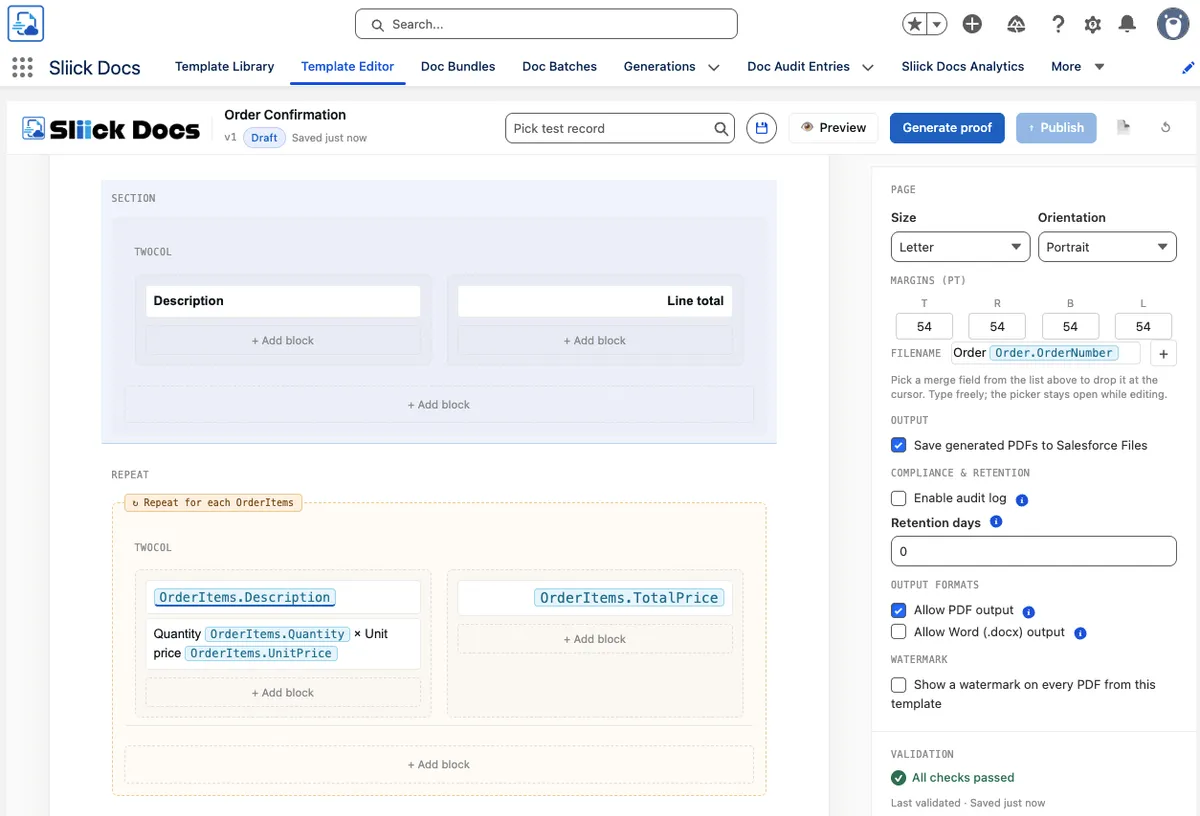
This is one source of truth, two output formats. The admin designs a template once. Each template has two checkboxes - Allow PDF Output and Allow Word Output - that decide which formats end users see. With one enabled, the record page shows a single Generate PDF or Generate Word button. With both enabled, the end user sees a split button and picks at runtime.
The data inside the document is identical. Only the file type changes.
When to pick which
PDF is for the documents you want to send as-is. Universal compatibility, hard to edit, looks identical to every recipient. Statements, invoices, receipts, signed contracts, audit-grade outputs.
Word is for the documents that need further editing before they go out. Editable in Word, Google Docs, LibreOffice, or anything that opens .docx. Use it for contracts the legal team will redline, offer letters that hiring managers personalise per candidate, proposals that sales tweaks per deal, board packs that the CFO marks up.
Before v1.2, “the customer wants a Word version” usually meant the team was exporting the PDF, recreating it in Word by hand, and accepting that the two would drift apart. v1.2 ends that workflow.
Where Word output works
- The record-page button (one click on any record).
- All three Flow actions -
Generate Sliick Doc,Generate Sliick Docs (Bulk),Generate Sliick Bundle- each gains an optional Output Format input. - The Doc Batches console and the list-view mass action (Individual output mode).
- Single-record bundle generation.
- Proof, during authoring - dual-format proof renders both files so authors can review each output path before publishing.
Things to know
A few honest constraints: bundle Word output uses the org’s default theme rather than per-template overrides; Word batches require Individual mode (not Combined); and templates that include a watermark or a barcode block are PDF-only (the validator catches this at save time, so authors usually split into two templates - one editable Word draft, one locked PDF). Templates published before this release need a one-time re-publish to enable Word output.
The file-name pattern auto-swaps the extension. A template with the pattern {{Account.Name}} - Quote.pdf becomes Acme Corp - Quote.docx when generated as Word, and back to .pdf when generated as PDF. No {{ext}} token, no admin work.
Bulk without a Flow: the list-view mass action
In v1.0, bulk generation meant either an admin opening the Doc Batches console or a Flow builder wiring up a record-triggered job. End users had no way to run a batch themselves.
v1.2 adds a list-view mass action. An admin adds a one-line custom list button to any object’s list views (Account, Opportunity, Contact, Case, Lead, Order, or any custom object - one button URL works everywhere). End users tick up to 200 records on a list view, click Generate Sliick Docs, pick a template and an output format, and the batch submits. The batch lands in the Doc Batches console with full status monitoring.
This closes the most common operational gap we hear about: an ops manager has a list of 47 records that need a document today. Before v1.2, they had to ask the admin to either build a Flow or run the batch console for them. Now it is one click from a list view they already use.
The button works for PDF or Word output. The object type is detected automatically from the records selected, so the same button URL works on every object - admins do not maintain one button per object.

Compliance: an audit log and a retention sweep
Two opt-in capabilities make Sliick Docs ready for regulated workflows.
Compliance audit log
Enable per template via an Audit Enabled checkbox. From that moment, every successful generation captures a SHA-256-fingerprinted snapshot of what was actually merged into the document for integrity verification - accidental corruption and changes made by non-administrator users are detectable by recomputing the digest against the stored value. It records who generated the document, when, against which record, with which template release, and what the resolved merge values were.
The point of this is not “we have a log somewhere.” It is “we can show, six months from now, what the customer received and verify the captured values have not been changed by the people who use the system day-to-day.” That is the difference between a document-generation tool and something a compliance team will sign off on. (Salesforce preserves the subscriber System Administrator’s authority over their own org data, so the digest is integrity-grade rather than evidentiary-grade against a fully privileged administrator - if regulator-grade tamper evidence is a requirement, layer Field History Tracking on the audit object or export digests to an external store.)
Practical use cases: regulated communications (financial services, health, insurance), donation receipts that the auditor wants to verify, accreditation and enrolment letters in education, contract cover letters where the executed version is what matters but the merge-time snapshot is the audit trail.
The write path is hardened so users cannot suppress or forge audit entries through permission-set holes - a narrow audit-writer service handles those records and only it can write them. End users do not see this; admins see an Audit Enabled checkbox per template and a list of audit entries per Generation.
Retention policies
Documents that have to be deleted after a certain window are awkward to manage by hand. v1.2 adds a per-template Retention Days field: set it to 90, 365, or any number of days. A nightly Doc Retention Job finds the artifacts that have aged past their window and hard-deletes them.
Two safety mechanisms make this safe to turn on:
- The Generation row survives as audit trail even after the file is gone, so you keep the “this was generated” record without keeping the file itself.
- A Hold from Deletion checkbox on individual Generations exempts specific rows. Use it for files that have to survive an open audit window, a legal hold, or a dispute.
The sweep is opt-in per template, so existing files keep behaving exactly as they did before v1.2. Admins schedule the nightly run from a button in Settings: pick a daily time, click Schedule.
The analytics dashboard
A new Analytics tab in the Sliick Docs app (admin-only) tells you what is actually happening with document generation in your org. Everything is sourced from existing generation history - there is no new tracking infrastructure to install and no separate data store to maintain.
What you see at a glance:
- KPI tiles for docs generated this month, last month, lifetime, and the success rate over the last 30 days.
- Daily volume as a column chart across the last 30 days.
- Top 10 templates and Top 10 users, so you can see what is being used and by whom.
- Failure breakdown as a donut chart, grouped by category. The categories are computed at the moment a failure is recorded, so the chart scales to billions of historic rows without slowing down.
The dashboard refreshes itself every five minutes; admins can also refresh manually.
The “Top 10 templates” view is more useful than it sounds. Most teams discover within the first month that the templates everyone said would be popular are not - and the small ones that an ops person built quietly are doing the heavy lifting. The dashboard surfaces that without needing a separate analytics tool.
Barcodes and QR codes as first-class blocks
Sliick Docs ships dedicated Barcode (Code 128) and QR Code blocks in the block palette. Bind either to a merge field, set width and height, and the block resolves at generation time to a scannable barcode in the document.
The encoder runs entirely inside Salesforce - no external service, no static images, no callouts to anything. This matters for shipping labels, asset tags, ticket numbers, member IDs, QR codes for event check-in, anything that needs a printable code on a record-driven document.
Like the rest of Sliick Docs, this stays inside your trust boundary. Nothing leaves your Salesforce org.
(Barcodes and QR codes are PDF-only. Templates with either block do not enable Word output; the validator catches this at save time and most teams split into two templates if they need both formats.)
Image blocks now do per-record artwork too
In v1.0, the Image block held a static file - the same image on every document. Per-record images were possible inside text via the image-merge-field chip, but as a standalone block they were static-only.
v1.2 gives the Image block a Source toggle: pick Static file for the same image every time, or Merge field for an image that varies per record. Bind it to any field that resolves to a Salesforce file Id and the image renders per record.
The everyday use cases this unlocks:
- Per-record letterheads - a custom letterhead field on Account so a statement looks branded for that customer’s segment without one-off-per-account templates.
- Signatory logos - the rep’s signature image stamped on every cover letter, pulled from a field on the User record.
- Hero images - a property photo on a lease summary, an asset photo on an inspection report, a product photo on a quote.
Static file is still the default and still the right answer for most templates. Merge field is there for the templates that need to vary.
Editor polish that adds up
A round of editor improvements that, individually, sound small - and together change how the editor feels day-to-day:
- Empty-canvas starter for new templates. New templates no longer open as a blank surface. Authors see a welcoming drop-zone that points to where their first block goes.
- Hard-stop on Preview, Proof, and Publish when validation has open issues. Broken templates cannot leak past the editor any more. If validation flags an error, the action button refuses until the error is fixed - rather than producing a broken PDF and a confused author.
- Multi-line toasts for multiple validation messages. When several issues need attention at once, each one renders on its own line in the toast instead of running together.
- Better caret behaviour around merge-field chips. Deleting in the middle of adjacent chips, or inserting at the end of one, no longer jumps the caret somewhere unexpected. Anyone who has authored a template with many chips will notice this immediately.
- Stale-preview-mode reset between templates. Switching from one template to another no longer carries over the previous template’s preview state.
- Duplicate-name auto-rename. If you try to create a template with a name that is already taken, Sliick Docs auto-renames the new one with a short suffix and surfaces a “Template renamed” toast so you immediately see what happened.
These are the kinds of things that make the difference between an editor that gets out of the way and one that quietly costs every author thirty seconds a hundred times a day.

A “Generations” tab that non-developers can find
In v1.0, the audit row for each rendered file was the Job__c object - which is fine for developers and unfriendly to everyone else. v1.2 renames it to Generation and pins a Generations tab to the Sliick Docs app navbar, between Doc Batches and Analytics.
Same data, same audit trail, same API name (so existing Flows, Apex, and integrations keep working without modification). Just findable by humans who do not think in __c suffixes.
Six starter templates, ready to import
We have published six ready-to-import starter templates that ship alongside this release:
- Sales Proposal (Opportunity) - cover proposal with account info, deal summary, line items, totals, and a signature block.
- Account Statement (Account) - snapshot with billing and shipping addresses and a list of recent Opportunities.
- Welcome Letter (Contact) - personalised welcome letter with salutation handling and owner traversal.
- Lead Follow-up (Lead) - post-first-contact summary with conditional sections and owner contact details.
- Case Summary (Case) - service-team case summary for sharing with the customer.
- Order Confirmation (Order) - customer-facing confirmation with line items and totals.
All six are built on Salesforce standard objects and standard fields only - no custom schema, no industry-cloud dependencies. They import cleanly into any sandbox or production org via the existing Import flow in the Template Library.
Use them as a starting point you can edit, or as worked examples of every feature in this release - Repeat blocks, aggregates, conditional content, multi-hop lookups, and the rest.
Download the starter templates →
Smaller things worth knowing
- Combined-mode capacity guard. Combined-output batches with more than 50 records now fail upfront in the pre-flight analyzer with an actionable “Switch to Individual mode” message, instead of silently exhausting the async heap part-way through. The actionable failure means an admin spots the problem before the batch starts, not 75 records in.
- Starter gallery. A free library of ready-to-import
.sdtstarter templates - Sales Proposal, Account Statement, Welcome Letter, Lead Follow-up, Case Summary, and Order Confirmation - all built on Salesforce standard objects so they land in any sandbox without schema dependencies.
What is intentionally not in v1.2
A few things we deliberately did not ship in this release - some because the underlying platform does not yet support them, others because they are scheduled for the next release:
- Per-page running headers and footers - the native Salesforce PDF engine does not yet support these.
- Nested Repeat blocks - one level of looping only.
- Word output for Combined / Both batch modes - Word batches use Individual mode. Combined and Both remain PDF-only.
- Word output for templates with a watermark or barcode block - the validator rejects at save. Split into separate templates if both formats are needed.
- Image watermarks, audience-visibility gating (templates restricted to specific permission sets), per-record template scoping, output-format lock,
{{RunningUser.*}}and{{Today}}/{{Now}}built-ins, and an Approval History child relationship - all in development for the next release.
We will write about each of these when they ship.
Upgrading
Sliick Docs v1.2 is live on the AppExchange. New installs get v1.2 directly.
A few notes for existing orgs:
- Existing templates default to PDF-only (Allow PDF Output is on, Allow Word Output is off). Nothing changes for existing users until an admin opts a template into Word.
- Templates published on v1.0 need a one-time re-publish if you want to enable Word output on them - re-publishing populates the snapshot the Word path needs.
- Existing batches, Flows, and integrations all keep working unchanged. The new Output Format input on the Flow actions is optional; the default is PDF.
- Existing audit and retention behaviour is unchanged for any template that does not opt in. Audit and retention are per-template checkboxes; existing templates inherit the default-off behaviour.
If you want a hand walking through the upgrade or planning where Word output, audit, and retention should land in your org, get in touch - we are happy to help.
Where to start
- Sliick Docs Complete User Guide - the full reference, updated for v1.2.
- Starter templates - six ready-to-import templates to play with.
- Sliick Docs product page - feature overview and AppExchange install link.
v1.2 was built from the things customers told us were still missing after v1.0. Keep telling us. The next release is already in design.