
Sliick Docs v2.1: A Document Platform
Sliick Docs v1.6 made templates portable between orgs and rounded out the editor with headers, footers, table-row repeats, and flexible columns. v2.1 is a much larger step. It grows Sliick Docs from a tool that generates documents into a platform that generates, collates, stores, and (in closed pilot) signs them - while staying native to Salesforce.
This is a consolidated release. It brings together everything we have built since v1.6 into a single generally available version, so existing customers move straight from v1.6 to v2.1. One of the most-requested capabilities - native electronic signature - is included as a closed pilot you can request access to today.
This article gives a high-level overview of what is new. For the step-by-step walkthrough, see the Sliick Docs Complete User Guide.
Evidence packs: every file on a record, in one document
This is the headline new capability. An image block in a template can now embed every file attached to a record - the record itself, or each child record beneath it - as a clean photo grid inside the generated document.
That turns a template into an evidence pack. Picture an account with a repeating section over its cases: each case renders with its details followed by a grid of that case’s photos, all collated into one document. It is purpose-built for the packs teams assemble by hand today - quarterly warranty claims by manufacturer, site-inspection reports, insurance evidence, project handovers, compliance bundles - and it produces them in a single click.
You control the layout: number of columns, thumbnail size, an optional cap on how many files to include, and file-name captions. The photos can come from Salesforce Files, or - when Sliick Files is installed - from your organisation’s connected cloud storage, whether that is Sliick Cloud Storage, SharePoint, Amazon S3, Google Cloud, or Azure. The feature works with or without Sliick Files; Sliick Files simply widens where the photos are allowed to live.
Generation at scale, even for image-heavy documents
Evidence packs can get large - dozens or hundreds of photos in a single document - and large, image-rich documents have always been the hardest thing to generate reliably inside any platform’s limits.
v2.1 introduces a premium high-volume rendering path for exactly this. When enabled, demanding documents - photo-dense packs, long image-heavy reports - are produced through a dedicated rendering capability that is not bound by the constraints that cap standard on-platform generation. The result is that the documents most likely to fail or time out elsewhere now generate dependably. Everyday documents continue to render the standard way with no change, and bulk batch runs stay on the native path by design.
If you are producing high-volume or image-heavy output, talk to us about enabling this for your organisation.
Keep generated documents in your own storage
High-volume document generation can put real pressure on Salesforce file storage. v2.1 lets you relocate generated documents to your own external file storage through Sliick Files, keeping bulk output off the org’s storage where that matters for cost or governance, while the document stays linked to its record exactly as before.
This pairs naturally with evidence packs: the photos can be read from your connected storage, and the finished document can be saved back to it.
A fully localised interface
Sliick Docs v1.6 localised the surfaces that everyday users see. v2.1 completes the work, so the interface is presented across more than ten languages - German, Spanish, French, Italian, Japanese, Korean, Dutch, Portuguese (Brazil), Chinese (Simplified), and Chinese (Traditional) - alongside English. Template content stays in whatever language the author writes it in; this is about the surrounding application, so international teams work in their own language with no admin configuration.
Now in closed pilot: native e-signature
The question every document-generation customer eventually asks is now that I have generated the document, how do I get it signed? Sliick Docs answers it natively - and that capability is now open for a closed pilot.
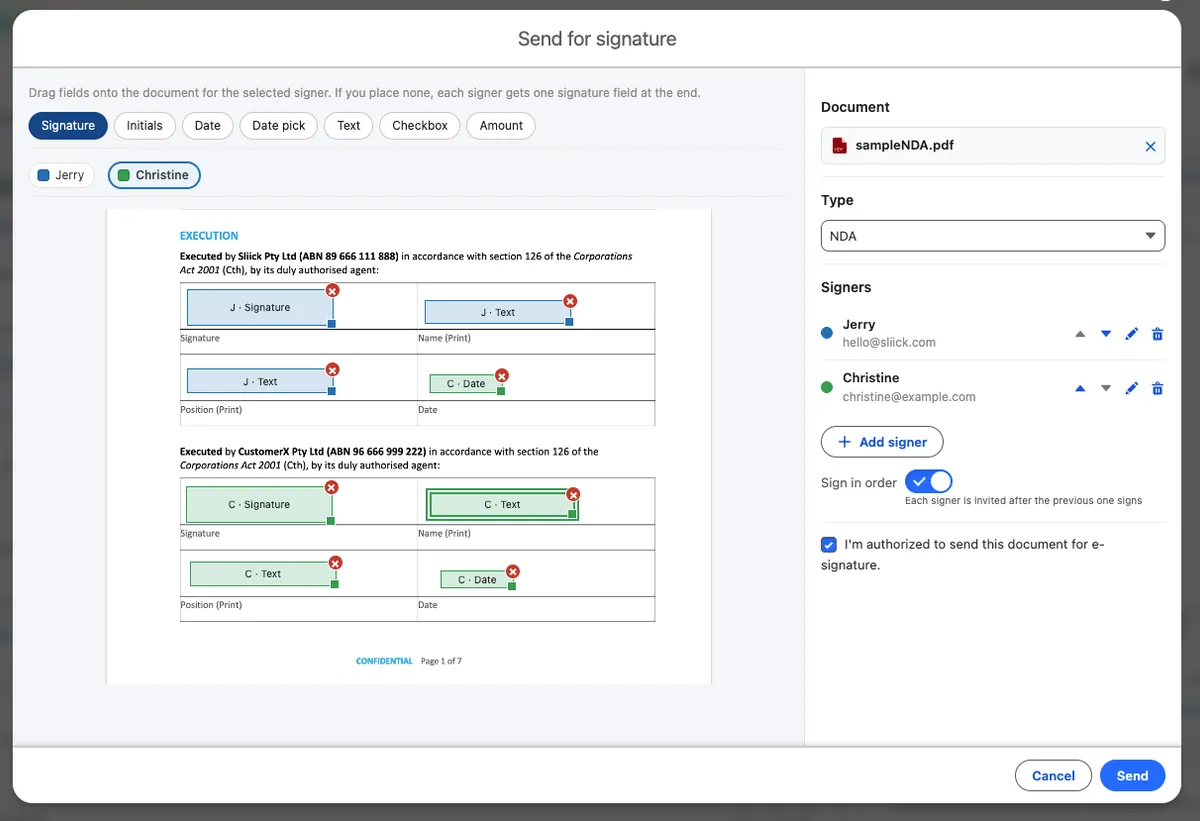
Native e-signature lets you send a document for legally meaningful electronic signature without leaving Salesforce, and without a separate DocuSign or Adobe subscription. You can send a generated document or an existing PDF, build the signer roster, place the fields, and route signing to everyone at once or in a set order. Signers complete the document in a branded portal on your own Experience Cloud site, with their identity verified by an emailed one-time code, and explicit, recorded consent. In-person signing on the sender’s device is supported too.
What sets it apart is the evidence layer. Every action on an envelope is written to a tamper-evident audit trail, checked automatically each night, and a Certificate of Completion captures who signed, when, from where, and against which consent text - and refuses to issue if the evidence does not verify intact. Anyone can later confirm a signed document is genuine through a public verifier, without logging in or uploading the file. All of the signing data stays in your Salesforce org.
The pilot also includes an optional sealed-document tier that produces an independently verifiable, tamper-evident signed PDF for organisations that need that extra level of assurance.
E-signature requirements vary by jurisdiction and document type, and some categories of document carry special rules. Sliick Docs provides signing capability and evidence tooling, not legal advice. We designed it against Australian requirements first, and the pilot is the right time to work through whether it fits your document types.
Want in? Closed-pilot places are limited. Contact us to request access to the e-signature pilot.
Editor and workflow polish
A set of smaller improvements round out the release:
- Cleaner image and gallery output - photo grids and image blocks render without stray cell borders, while data tables keep theirs, so embedded galleries look intentional.
- Externally stored images preview accurately - an image sourced from your connected storage shows its name and a correctly sized placeholder as you design, so the canvas matches the output.
- Manage your proofs - you can now delete a test proof directly from the proofs drawer, and cloud-stored proofs show their real saved file name.
- More dependable signing notifications - completion and certificate emails are sent reliably, and cancelling an in-flight signing request now sends a clear notification to participants.
Upgrading
Sliick Docs v2.1 is live on the AppExchange. New installs get v2.1 directly.
A few notes for existing orgs:
- Everything from v1.6 carries forward unchanged. All your existing templates, bundles, batches, and the portability features continue to work exactly as before. The new capabilities are additive - your documents render the same until you choose to use them.
- Evidence packs are ready to use immediately with Salesforce Files. To read photos from, or save output to, your own cloud storage, add Sliick Files.
- High-volume rendering and external storage are premium options. Get in touch to have them enabled for your organisation.
- E-signature is a closed pilot. It stays completely out of the way until you opt in, and pilot access is by request.
Where to start
- Sliick Docs Complete User Guide - the full reference.
- Sliick Docs product page - feature overview and AppExchange install link.
- Sliick Files - bring-your-own cloud storage for photos and generated documents.
v2.1 is the largest release in the product’s history, and it sets up what comes next. If you would like a hand designing an evidence-pack template, enabling generation at scale, or joining the e-signature pilot, get in touch.