
Sliick Docs v1.4: Generally Available
Sliick Docs v1.3 added authoring shortcuts and template-level compliance controls. v1.4 turns to the experience of building templates: a more navigable editor, faster ways to find and insert merge fields, and folders to keep a growing template library organised. It remains native-tier, with no new external dependencies.
This article gives a high-level overview of what has changed since v1.3. For the step-by-step walkthrough, see the Sliick Docs Complete User Guide.
A redesigned editor layout
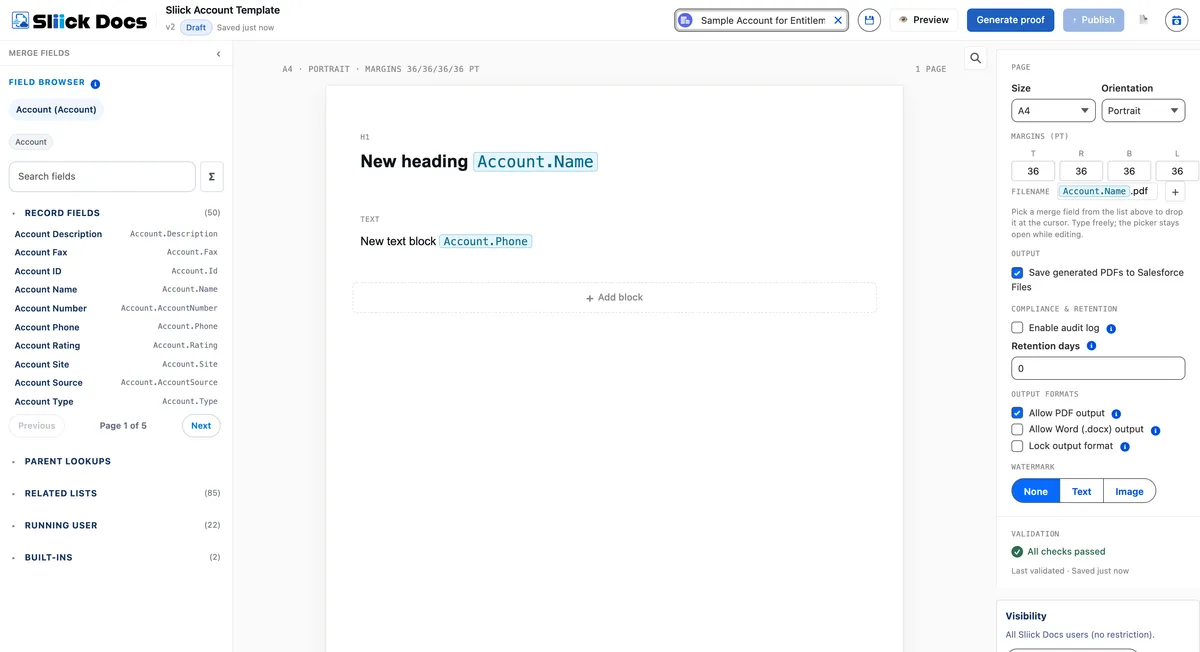
The merge-field browser now has its own dedicated panel beside the canvas, rather than sharing the right-hand side with block settings. That gives the design area and the block settings more room, and the browser stays in place as a constant reference point instead of disappearing when you select a non-text block. When you want more space, the panel collapses to a slim strip and reopens with a single click.
Faster merge-field navigation
Finding the right field is quicker, especially on objects with a large number of fields. Fields are grouped into clearly labelled, collapsible sections - record fields, parent lookups, related lists, running user, and built-ins - each showing how many fields it contains. A search box filters across every section at once, and long lists are paged so they stay manageable. The result is far less scrolling on records with dozens of fields.

Insert related-list data without extra setup
Authors can now browse a record’s related lists - such as Contacts, Opportunities, or Cases - directly from the field browser and insert them in a single step. Previously, showing a child relationship in a document meant setting up a repeating section first. Now, choosing a related list sets that up for you, so building a table of a record’s related items is a much shorter path.

Find and replace
A new find-and-replace tool lets authors search the text in a template and replace it in place, with options to step through each match and to match case. It is a practical time-saver when a product name, a legal phrase, or a piece of boilerplate needs updating across a longer template.

Organise templates into folders
The template library now supports folders. Teams can create folders, rename and delete them, and move templates between them, so a library that has grown across several teams stays easy to navigate. Templates that have not been filed yet sit under an “Uncategorised” view, and a single “All templates” view still shows everything at once.

Editor refinements
A set of smaller improvements make day-to-day authoring smoother, including a cleaner way to set signer labels in signature blocks and closer alignment between what authors see while editing and what the finished document produces.
Upgrading
Sliick Docs v1.4 is live on the AppExchange. New installs get v1.4 directly.
A few notes for existing orgs:
- All v1.3 templates keep working unchanged. The editor changes are presentation only, and folders are optional - your existing templates simply appear under “All templates” until you choose to file them.
- No configuration, metadata, or integration changes are required.
If you would like a hand getting your team organised in the new library, get in touch.
Where to start
- Sliick Docs Complete User Guide - the full reference, updated for v1.4.
- Sliick Docs product page - feature overview and AppExchange install link.
v1.4 builds on the feedback customers shared after v1.3. We welcome more of it, and the next release is in design.