
Webhooks
A webhook tells another system each time a response comes in. That system could be an automation tool, your own API, or a chat channel (through something that formats the message).
You give the form a Webhook URL. Sliick Forms then sends one HTTPS POST to it for each response, shortly after the response arrives.
Set it in the builder: click the gear icon, then Notifications & integrations. See Form settings.
Set it up
Section titled “Set it up”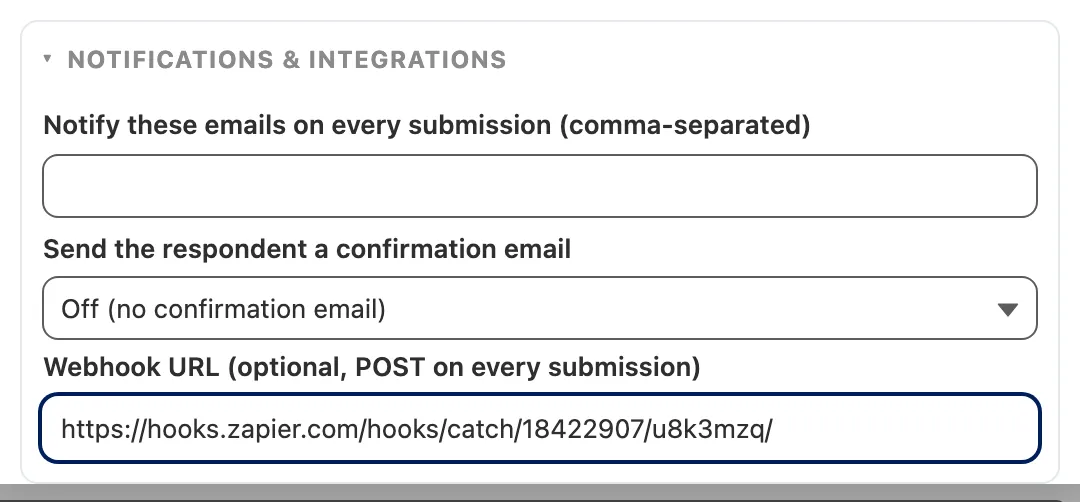
- Add the URL to the form. It must start with
https://, or it will not save. - Allow the address in Salesforce. In Setup, go to Security, then Remote Site Settings, and click New. Enter just the start of the address, for example
https://hooks.zapier.com, and leave Active ticked. You have to do this yourself, because each form can use a different URL. - Send a test response from the builder’s Test link and check that it arrives.
If you skip step 2, nothing arrives and nothing warns you. Salesforce blocks the call. The response is still saved, but no error shows in the builder, in Form Log, or by email. If a new webhook never arrives, check Remote Site Settings first.
What it sends
Section titled “What it sends”A POST with the header Content-Type: application/json and a body like this:
{
  "formExternalId": "support-intake",
  "submissionId": "a0B5g00000XyZabEAB",
  "correlationId": "web-12345",
  "receivedAt": "2026-10-03T01:02:03.000Z",
  "payload": {
    "email": "casey@example.com",
    "issueSummary": "Cannot access account"
  }
}| Field | What it is |
|---|---|
formExternalId | The form’s public ID |
submissionId | The 18-character ID of the Form Submission record in Salesforce |
correlationId | The link ID the response arrived with, or null |
receivedAt | When Salesforce received the response, in UTC |
payload | The answers, keyed by each question’s API name |
- The answers are exactly as the respondent sent them. A correction saved later in the responses console does not change what the webhook sends.
- A repeating group is an array of row objects. See The submission payload for the full shape.
- Read the fields by name. Their order in the body can change.
Slack, Teams and other chat apps
Section titled “Slack, Teams and other chat apps”You cannot paste a chat app’s own webhook URL here. Slack, Microsoft Teams and Discord each expect their own message format, so they reject this body. Slack, for example, answers 400 no_text. Sliick Forms does not report a rejected delivery, so the message just never appears.
Put something in between that turns the response into a chat message:
- A Salesforce flow. Build a record-triggered flow on Form Submission that runs when a record is created, and post the message with Salesforce’s Slack actions or your own. This needs no webhook and no Remote Site Setting. The flow sees the Salesforce record, not the body above: the answers are in one field, Raw Payload JSON. The simplest message is “New response to form name” with a link to the record. Add entry conditions so the flow skips records with Is Test, Suspected Duplicate or Failed Validation ticked.
- An automation service such as Zapier (Webhooks by Zapier, Catch Hook) or Make (Custom webhook). Use the URL it gives you as the Webhook URL, add its address to Remote Site Settings, then add a Slack or Teams step that posts the answers you choose.
- Your own endpoint, such as a small serverless function that reshapes the body and forwards it to the chat app.
When it is sent, and when it is not
Section titled “When it is sent, and when it is not”- Once per response, shortly after it is saved. It does not wait for the response to be processed onto records.
- No retries. Your endpoint has 10 seconds to answer. If it is down or returns an error, that delivery is lost. The response itself is safe in Salesforce, in the responses console.
- Occasionally twice. Use
submissionIdto ignore a repeat. - Test responses are sent too, and the body does not say so. To tell them apart, look up the record by
submissionIdand check its Is Test field. - Flagged responses wait. A suspected duplicate is sent when someone clicks Mark as genuine. A response that failed validation is sent when someone clicks Accept for processing.
receivedAtstill shows when it first arrived, so it can be days old. Clearing either flag by editing the record directly sends nothing. - Nothing is sent for a response that was not saved, such as an exact repeat of one already received, or one that arrived after the form closed.
- Changing the URL only affects later responses. A delivery already waiting goes to the old URL.
- Very large bursts can hit a Salesforce daily limit. Webhooks use your org’s daily allowance of background jobs, at ten deliveries per job. A delivery that cannot be queued is not sent, and is recorded in Form Log under the operation
WebhookChain.
Keep the URL private
Section titled “Keep the URL private”Treat the Webhook URL like a password: anyone who has it can post to it. An automation service’s URL already contains a long random token. For your own endpoint, put a long random value in the path.